Loading...
Loading solutions...
Does long time sleep of hackintosh laptop do damage to its hardware ?
Image
Laptop specs: thinkpad x1 yoga 3rd i7-8550u uhd620 ​ I disable all the hibernation related option in this guide , and the picture below is my setting. I'm curious about whether long time sleep(perhaps more than 8 hours) will do damage to its hardware. Thanks. https://i.redd.it/j905qfynei731.jpg submitted by /u/jamesxxx1997 [link] [comments] [► Source]
I5 9400f Hackintoshable?
Image
Hello, have a nice day for u all Iam planinlg on building an Intel hackintosh With I5 9400f and gigabyte auros b360 wifi With asus dual radeon rx 580 oc To run Mojave I know that mb will need to update bios and I have no prob with this But this cpu have no gpu chip And I work only with adobe apps So I don't need gpu chip Is that will be good for me Am I going to any problem Is the cpu will be supported? submitted by /u/Abosenna24 [link] [comments] [► Source]
if i installed Mojave on a laptop that has no support online what features would probably not work?
Image
i want to try to install Mojave on my 5 year old laptop, what would probably not work? it has an 3rd gen i5 and a gtx 630. i know that i would have to change the wifi and bluetooth modules for some macOS features to work... what else? usb, headphone jack, keyboard, webcam, trackpad, ethernet...etc this is just a trial run because im planning on upgrading my laptop and want to know how feasible it is to install macOS on a laptop that has no support online. submitted by /u/Awoooooooooooga [link] [comments] [► Source]
Virt Manager not properly working
Image
Hello people in Hackintosh community, this is the first time I ask a question in Hackintosh Reddit so plz tell me if I violated the rule but anyways, when I'm doing `virsh define hackintosh.xml` it gives off a warning: ​ PS. I'm using Manjaro with a nonfree driver, updated all library to newest with the package manager submitted by /u/Shuaiouke [link] [comments] [► Source]
Laptop recommendation? Actual MacBook Pro replacement?
Image
Hey guys, I've been thinking of building a hackintosh laptop and does anyone have any suggestions/thoughts on having it on something similar to a 15inch MacBook Pro replacement in physical form? (screen + thinness)? submitted by /u/thnok [link] [comments] [► Source]
Randomly can't wake from system lock (CTRL+SHIFT+EJCT)
Image
I formed a habit of locking my terminal many years ago. Every time I go to leave my house or go to bed, I hit CTRL+SHIFT+EJECT to lock my Hackintosh. Until I upgraded to 14.3 (anything higher bricks my hackintosh, separate issue) everything was fine, but now that I have, when I hit a few keyboard buttons to wake up the display (the machine is set to stay "on", disks and all, the display is all that goes off), signal is sent to my display but the screen is just black. Nothing rendered. No mouse cursor, no response from the operating system. I can't get it to "sleep" again and try to re-wake it either. Boot args include darkwake=8 dart=0 nv_disable=1 but I tested those and it won't boot without them. Hardware: https://pcpartpicker.com/list/dckjtg + Vega 56 + MSI Gaming M7 + Intel Core i7-6700 Any ideas how I might fix this? Thanks all. submitted by /u/prophet-of-dissent [link] [comments] [► Source]
Install OS X El Capitan.app
Image
Hello all. So I'm just about to give up. I've tried everything to get my hands on the El Capitan Installer. The App Store does not allow El Capitan downloads, nor does the recovery image allow me to reinstall El Capitan. Would anyone have a spare Install OS X El Capitan Installer.app in which could be shared through Google Drive? I understand this may be a bit inconvenient, but it would really just be a lifesaver if you have the extra time for it. Thank you in advance. If anything is necessary in return please let me know :) submitted by /u/Msk_SHN0 [link] [comments] [► Source]
Are these specs compatible with hackintosh?
Image
Hey guys im new to this, can anyone tell me are these specs compatible with hackintosh? Thanks CPU- i5 3470s GPU- Sapphire Nitro+ RX 570 OC RAM - 16gb RAM submitted by /u/OgiDW [link] [comments] [► Source]
Would it be possible to use a Quadro K4000?
Image
I have a K4000 that I pulled off a workstation I'm hoping it'll work with my build im making for the wife. Thanks submitted by /u/iammrh4ppy [link] [comments] [► Source]
First time Hackintosh build, please help!
Image
I get the initial apple loading bar to fill up about half way and then I get a white "prohibited" symbol. Please help if you can! Motherboard Model: NZXT N7 Z370 CPU: i7-9700K GPU: AMD Radeon RX 580 Kexts: AppleALC AtherosE2200Ethernet FakeSMC IntelGraphicsFixup IntelMausiEthernet Lilu NvidiaGraphicsFixup RealtekRTL8111 USBInjectAll VoodooHDA WhateverGreen XHCI-200-series-injector submitted by /u/ViovaGaming [link] [comments] [► Source]
Updated to Catalina Beta, Kernel Panic
Image
Updated clover, updated lilu and whatevergreen (only updated them in clover/kexts/other, forgot to update l/e) ​ Panic message says something along the lines of : failed to flush stackshot data. ​ Clover folders here: https://upload.cat/b029431853d1e5d3 ​ Can anyone help me get my laptop unhobbled? I really don't want to reformat. submitted by /u/th3suffering [link] [comments] [► Source]
HD4400 Help, text is blurry, incorrect resolution
Image
Hi everybody, I'm trying to fix my iGPU for my hack. It's has the i3-4130 as it is the Lenovo m73 tiny. So my problem is that I followed the vanilla install guide and under "Devices" in Clover Configurator, I used device-id/12040000 to fake my GPU. It kind of works in the sense that I get full acceleration but what I don't get is clarity. VRAM says it is 1536mb. The text looks blurry on my monitor, the resolution doesn't detect 4k, and it detects my monitor as 30.5 inches even though it is only 27 inches. So I tried using the other option which was AAPL,ig-platform-id/0300220D. In this mode, the text is a lot clearer, 4k is detected, but no acceleration. Also, for some reason it detects my display as 61 inches. VRAM in this option is 44mb. Neither of these options are very good. Would appreciate any help in trouble shooting this problem. Thanks in advance! submitted by /u/WongJeremy [link] [comments] [► Source]
Who else uses iStat Menus on their Hackintosh?
Image
https://bjango.com/mac/istatmenus/ I love this tool. I install it on every real mac and hackintosh. Mainly for the logging and easy customizing monitoring. I really like the battery monitoring since Apple removed the Time left and time till charged. This adds it back. It also adds RAM, CPU, Network, and Storage. Status and monitoring submitted by /u/MaddMaxx636 [link] [comments] [► Source]
Osx won't boot with internal graphics enabled in BIOS
Image
Hi there, I was hoping you fine people could help me. I'm using a hackintosh build with a aorus z390 pro wifi, 32gb 2400mhz ram, msi rx 580 armor, and an i7 8700k. Since updating clover I have not been able to able to boot into OSX with my internal graphics enabled in the BIOS. I am able to disable it and log in while connected to my rx580, but whenever I try to enable it I get a "couldnt allocate runtime area" error and can't login. I don't know what has happened, I've been using my hackintosh with the igpu enabled for months. I really need the igpu to work for hardware acceleration so if anyone has any suggestions it would help a lot. submitted by /u/Beanoooooo [link] [comments] [► Source]
OpenID Foundation Raises Concerns About 'Sign In With Apple'
Image
The OpenID Foundation has posted an open letter to Apple raising concerns about its upcoming 'Sign In With Apple' feature. Announced earlier this month, Sign In With Apple will let users sign in to apps and websites using their Apple ID when iOS 13 and macOS Catalina launch. Sign In with Apple was built from the ground up to give users peace of mind about their privacy. Data collection is limited to the user’s name and email address, and Apple’s private email relay lets users receive email even if they prefer to keep their address private. Apple will not track users as they interact with your app. Share Article: Facebook ,    Twitter ,    LinkedIn ,    Google Plus ,    Email ,    Reddit ,    Digg ,    Delicious ,    StumbleUpon Follow iClarified: Facebook ,    Twitter ,    LinkedIn ,    Google Plus ,    Newsletter ,    App Store ,   ...


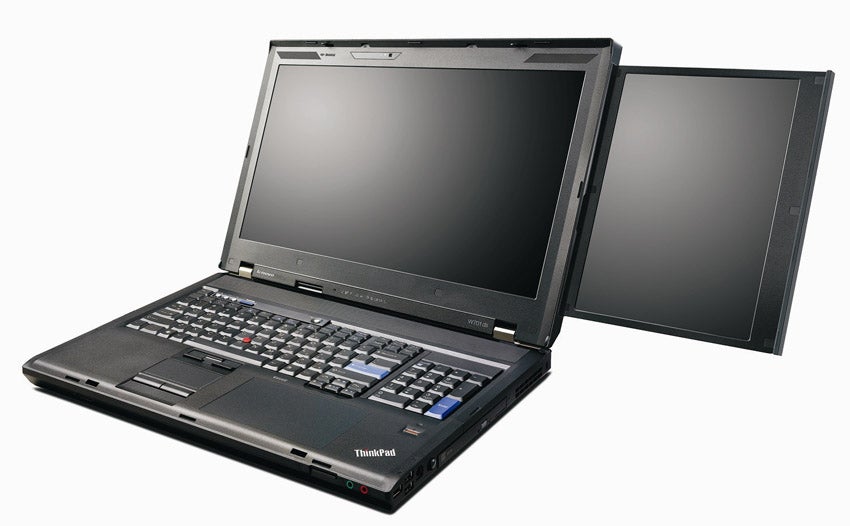
Help with the ultimate Hackintosh - Thinkpad W701ds
Image
https://i.kinja-img.com/gawker-media/image/upload/18moyjw4sse9njpg.jpg System specs: i7-940XM 32GB DDR3 Nvidia FX 2800M I simply cannot get this thing to the desktop. With nv_disable=1 I can get to the Installer and Recovery environment fine, but it does not get me to the desktop. All graphics flags have been tried. Using SMBIOS MacbookPro10,1. What now? submitted by /u/The_Forgotten_King [link] [comments] [► Source]
Natively supported PCE-AC68 not working on High Sierra
Image
I recently got high sierra successfully installed, along with every driver I need, besides wifi. I have a Asus PCE-AC68, which everywhere I checked is supposed to natively work out of box with High Sierra. The issue with it is when i go to network preferences, I cannot turn wifi on, and it says "Status: Off ". I don't think it's properly detecting it or something. I can 100% confirm it works, it works great in windows 7 & 10. In DPCIManager it shows up as "BCM4360 802.11ac Wireless Network Adapter", and seems to be using the "AirPortBrcmNIC" kext which is apart of IO80211Family.kext I've tried installing every variety of broadcom kext that may fit that google searching has suggested, along with a variety of various patches and config things I even reinstalled removing most added internet related kexts I've also tried the card in different slots I'm just stumped on why a confirmed working "out of box natively supported...
Installing mac osx on virtual box.
Image
Hello, I've come here for help because I tried to follow a tutorial with a given iso, but when I boot the virtual mac os mavericks. It would stay in the shell, saying cannot load drivers etc.. ​ So Is there any good iso. I know i've tried to look the sidebar but i'm not sure which one should I take. submitted by /u/Jinjjaoh [link] [comments] [► Source]
Successful Catalina 10.15 Hackintosh on Dell Optiplex 9020
Image
Big thanks to the hackintosh community! Upgraded from High Sierra to Mojave to Catalina Beta flawlessly. submitted by /u/skyunderearth [link] [comments] [► Source]
Considering building an audio recording machine ..
Image
​ Hey folks, ​ I am considering building a machine for general use and running Logic Pro X and plugins etc. Currently I have a MBP 15" its from 2013 but it has an i7 and 16gb ram 512 ssd. ​ I'm wondering how much I would need to spend to create a desktop PC hackintosh that significantly outperforms this MBP and does so in a silent fashion. Fan noises drive me bonkers as I record primary acoustic music so noise floor is key. ​ As far as video card goes, I doubt I'd need anything special. Powering 2x4k monitors would be great. I don't play video games etc. ​ Oh ya it *must* have thunderbolt to work with my Universal Audio Apollo 8 recording interface. ​ Any ideas on mobos, cases, cooling, procs etc would be appreciated as food for thought ! ​ Thank you -Kevin submitted by /u/locusofself [link] [comments] [► Source]
XPS 15 9560 wake from sleep high power usage
Image
I post this over here: here , but I thought I would ask here as well. I know tonymacx86 isn't very well liked here, but I followed the above guide and got a vanilla setup going. Everything seems to work very well, except I'm noticing high power usage when the laptop wakes from sleep. If I perform a reboot, the power usage goes back down. I'm seeing about 10-11 watts usage on a reboot and about 20-22 watts usage upon waking from sleep. I was wondering if anybody else is seeing this. submitted by /u/jmayniac [link] [comments] [► Source]
ThinkPad e480 help needed
Image
Hi all Looking to hackintosh my ThinkPad and get stuck at the black Apple logo. The bar loads full but never get any further Used the efi from this guide https://github.com/aliyoge/Hackintosh-ThinkPad-E480 I5 8250u 8GB ram 256 pcie SSD and 240gb sata for Mac OS X submitted by /u/jamiehicks154 [link] [comments] [► Source]
Need suggestions for new build
Image
In the coming months I would like to build a new Hackintosh. I have one now, but it's getting long in the tooth. I want to have a mother board that will accommodate two M2 cards so I can dual boot (OSX/Windows) A board that can accommodate my VEGA 64 card One that has Thunderbolt 3 I have a Fenvi T919 in my current rig that works great w/ OSX that I'd like to drop in the new rig. (So I'll need a slot for that!) The smaller the footprint the better :) ​ Sooo...with that in mind, can anyone recommend a board that will meet/exceed these requirements? ​ Thanks in advance. submitted by /u/SpottedClam [link] [comments] [► Source]
Internet Install Media Installer Help
Image
I am using the Internet Install Method because I don't have a Mac. You can find details about my Lenovo Thinkpad x220 here: https://www.reddit.com/r/hackintosh/comments/c6siq7/x220_hackintosh_help/ I am using a 16GB Sandisk Cruzer USB 2.0 and getting this error: DiskPart exited with non-zero status (1). Aborting. Any help would be appreciated, Thanks! submitted by /u/ebaad1009 [link] [comments] [► Source]
Clover Bootloader not finding macos without USB stick being plugged in
Image
I'm struggling a bit guys and wandered if anyone can help. I've got my Hackintosh all working (whilst the USB stick is plugged in) and it allows me to either boot to High Sierra or Windows 10. The problem I have is, that If I unplug my USB stick, it only sees Windows 10. This is what I've done....... I copied my Clover folder from the EFI folder on my USB stick to the EFI folder on my HDD.........Now this is where I think the problem is. I then tried to install Clover to my HDD but it will only allow me to install it to my USB stick....When I try to change the installation path it shows my USB stick and HDD but on my HDD it has a yellow triangle on it and says I can't install it to that location. Some people tell me you nee to do that other's tell me you don't. How can I install Clover to my HDD so I can boot to it without having to have the USB always plugged in? Thanks in advance submitted by /u/aide199 [link] [comments] [► Source]
Has anyone hackintoshed an acer aspire E5-576-392H?
Image
I’m looking into buying this laptop and installing macOS on it but I’m not sure it will work I think it will but I’m not 100% certain. Has anyone hackintoshed this laptop? If so please leave your experience and files if needed down below thank you. Here’s the laptop https://www.amazon.com/dp/B079TGL2BZ/ref=cm_sw_r_cp_api_i_8i2fDbGS54XM8 submitted by /u/jacksondnm02 [link] [comments] [► Source]
macOS Mojave not working on VMware (AMD cpu, used guide on AMD-OSX knowledge base)
Image
Hey, I want to do a Vanilla install on my Ryzen PC and I want to do it the way using machine already running MacOS (createinstallmedia I think) but I can’t make my Mojave VM to work. Using most of the tutorials VM got stuck on APPLE logo when booting even before installing/trying to install. When I used the guide on AMD-OSX knowledge base it booted to the installer but when It came to installing OS it said something like error, download corrupted, try again and redownload installer . Can anyone help me? submitted by /u/pc-guy-2019 [link] [comments] [► Source]
Internal display disabled (black screen) when hdmi is connected before boot
Image
As per title. I have a Lenovo V130-15IKB. The internal display remains black (though it’s still recognized in display list) when hdmi in inserted before booting up macOS. It has only igpu HD 620 (i3 7020U) submitted by /u/cipi1965 [link] [comments] [► Source]
Kext won't load on Mojave.
Image
Hiya, I'm trying to load an kext for my LSI Raid Card (specifically this one https://www.insanelymac.com/forum/topic/285197-driver-for-lsi-megaraid-sas-family/ ) and it not appearing to load on Mojave, any ideas? ​ System Information for the Extension submitted by /u/ToxicTransit [link] [comments] [► Source]
New build, Ryzen 2700 or I5 9600k
Image
Hey guys, I would like to build a new pc to run Windows and Mac for ios development. I can get a 9600k or a ryzen 2700 both around 200€ I know that ryzen it's better for productivity but how stable it is for doing work on mac os. Any advice helps a lot. submitted by /u/zam0s [link] [comments] [► Source]
Hd5450 In 10.12 Sierra
Image
Hey guys This isn’t strictly a hackintosh but I thought this would be the best place to ask I’m running Sierra in a VMware esxi virtual machine with a physical 5450 on pcie pass through. It’s not a hackintosh in the sense it’s a vanilla App Store install with no third party boot loader. Anyone know if it’s possible to get this 5450 running? Guessing it’s a simple as a kext edit? submitted by /u/InfaSyn [link] [comments] [► Source]
Finally got everything set up on my first hackintosh
Image
submitted by /u/rahul792001 [link] [comments] [► Source]
Weird Glitch After Waking from Sleep
Image
submitted by /u/poezda [link] [comments] [► Source]
First hackintosh, Gigabyte Brix GB-XM11-3337, replaced Wi-Fi card for Broadcom, test install on USB stick
Image
submitted by /u/rstepanov [link] [comments] [► Source]
How do I get my audio working?
Image
Hi guys. Last night, I got my hackintosh kind of working, the only thing missing is the audio. First of all, my specs are: - MSI Bazooka B250 Gaming - Nvidia 1060 6GB - i5 7500 - 16GB RAM ​ My question is: I have HDMI cable connected on my NVIDIA. Do I need to activate anything else? I already have the "important" audio kexts installed like AppleALC, CodecCommander, FakeSMC, Lilu and WhateverGreen. Thanks. submitted by /u/thomasginn [link] [comments] [► Source]
Mojave 10.14.5 freezing update...
Image
OK, so I backed everything up with Time Machine, and then went back to latest 10.13.6, and then Time Machine would not allow me to restore apps/documents from a newer TM backup (thanks Apple). I then did a latest 10.14.5 install over the top of 10.13.6 (APFS conversion took a very long time tho, even with just a fresh OS only). and updated Clover to very latest. Been running for 49 hours now without a freeze... I also updated VLC to latest version, as there was a bug that could cause cache overflow with malicious videos. (3.0.6 and below are susceptible). Hardware: Gigabyte H370 HD3 + RX 580 8GB + 16GB DDR4 RAM + 2 x Intel 660p NVME PCIE SSDs + Samsung 4K monitor (connected via HDMI 2.0). submitted by /u/themacmeister [link] [comments] [► Source]
ASRock B365M Pro4 + i5 9600K + 16 GB RAM
Image
submitted by /u/Eurofighter_Ty [link] [comments] [► Source]
Any tips getting my High Sierra build to recognize my Nvidia N750 Ti TF graphics card?
Image
Been working at this for hours now, thought I'd drop it here in case I get lucky. Just reworked my Z620 workstation to boot into High Sierra, but now it's not recognizing my graphics card. I have tried both: * Following this guide on hackintosher. * Installing drivers using Benjamin-Dobell's script Current Results: On 'About This Mac', graphics shows: "Display 8 MB". (At some points in the process, it has said "Nvidia Chip Set 8 MB"). On 'System Report' >> Extensions: No NVDA or GeForce extensions are loaded (including NVDAStartup), My rig is: Motherboard: Z620 CPU:Intel Xeon E5-2600 Graphics Card: N750 Ti TF 2GD5/OC Boot helper: Clover OS: Version 10.13.3 (17D47) My relevant settings are: No 'nv_disable=1' boot flag. Clover Graphics >> No checkboxes checked (e.g., 'Inject Intel' is unchecked). Clover System Parameters >> 'NvidiaWeb' checked. Clover Rt Variable >> CsrActiveCon...