Archive for October 2013

Install Niresh 10.8.2 and gives reboot message #Hackintosh

By Freirburro

Install Niresh 10.8.2 and gives reboot message #Hackintosh

This page historically documented the legacy "Install Niresh 10.8.2 and gives reboot message #Hackintosh" release. In compliance with copyright guidelines and Google AdSense policies, all direct download links, torrents, and links to modified installation media have been permanently removed.

Using modified operating system distributions (commonly known as "distros") is highly discouraged as they can contain unverified modifications, security risks, and cause system instability. Modern Hackintosh configurations should always use clean, official macOS installers sourced directly from Apple servers.

Recommended Resources

Share:

Sapphire HD 6870 4 Port 10.9 (Duckweed) #hackintosh

By Freirburro
J'ai essayé de repatcher le fichier j'espère que celui marchera bien pour vous.source
Share:

ATI Radeon HD 550v/4650(1002_9480) OSX 10.9 Mavericks #hackintosh

By Freirburro
This is the kexts for ATI Mobility Radeon HD 550v/4650 (1002_9480), taken from OS X 10.9 (13A603).

Edited by me, works also HDMI & VGA output. Thanks bcc9 & crazybirdy - insanelymac.

Delete only AMD4600Controller.kext.

Install these two kexts with kext utility or others kext installer.

Reboot.

Done !!! source
Share:

AppleHDA 2.5.2 (10.9 GM) for ALC898 #hackintosh

By Freirburro
This is AppleHDA 10.9 GM patched using Toleda's patches and guides.

Works on my GA Z77X UP5 TH motherboard, with DSDT layout ID 01.source
Share:

BCM5722D.kext moodet for 14E4:1690 #hackintosh

By Freirburro
Working on Acer TravelMate 8572TG (BCM57224) with Mountain Lion 10.8.5 and Mvericks 10.9 (13A598).

Instal with Kext Helper or put in IONetworkingFamily.kext/Contens/Plugin and fix permission.

After restart will be working. MAC Address in properitis show sometims 00:00::00:00:00:00 but

somebody maby fix it in future.

Happy networking. Wiki.source
Share:

Intell HD 1st generation full support kexts for Maverics... #hackintosh

By Freirburro
Intell HD 1st generation full support kexts for Maverics...For me works fine...Posted Image

Please feedback about this...Thanks...source
Share:

Nvidia CUDA #hackintosh

By Freirburro
Version: 5.5.28

Release Date: 2013.10.23

Operating System: Mac OS

Language: English (U.S.)

File Size: 54 MB source
Share:

Linksys WMP300N based on Broadcom chip (v1) #hackintosh

By Freirburro
this is my modified kext for IO80211Family.kext


it comes from OS X 10.8.5 installation


i added the Linksys WMP300N based on the Broadcom 4329 chip (aka v1)


install it in S/L/E or E/E with your preferred kext installer, and repair caches and permissionssource
Share:

Intel GMA 4500hd problem, please help... #Hackintosh

By Freirburro
i'm using hackintosh for more than a year now, and everything was excellent until i decided to install 10.8.2, and i used 10.6.8 without problems...... source
Share:

AR9227 for Mavericks #hackintosh

By Freirburro
install in /Extra/Extensions folder


it's work on TL-WN851ND


should work on TL-WN751ND AND AR9285 source
Share:

AppleHDA 10.9 ALC889 #hackintosh

By Freirburro


Device (HDEF)

{

Name (_ADR, 0x001B0000)

Method (_PRW, 0, NotSerialized)

{

Return (Package (0x02)

{

0x0D,

0x05

})

}

Method (_DSM, 4, NotSerialized)

{

Store (Package (0x04)

{

"layout-id",

Buffer (0x04)

{

0x0C, 0x00, 0x00, 0x00

},

"PinConfigurations",

Buffer (Zero) {}

}, Local0)

DTGP (Arg0, Arg1, Arg2, Arg3, RefOf (Local0))

Return (Local0)

}

}


Without DSDT take HDAEnabler889.kext.source
Share:

Geen geluid na software update #Hackintosh

By Freirburro
NO SOUND AFTER SOFTWARE UPDATE. Sorry thought this was a dutch forum. I have a hackintosh with Mountain Lion, sadly there has been a software... source
Share:

Dual boot, separate SSDs, can't boot to Mac OSX after install. #Hackintosh

By Freirburro
Hey all, I'm trying desperately to get this thing off the ground. I've followed all the tutorials on hackintosh.com via tonymacx86.com that I can... source
Share:

Lenovo G580 10.8.x Kexts #hackintosh

By Freirburro
All required kexts and tools to run Mountain Lion 10.8.x on Lenovo G580 without needing to use any other tool or kext.

Tested on Mountain Lion 10.8.5 (12F45)


This Package Contains:

0. Kext Utility (Kext Installer)

0. Extra folder that contains pre-edited DSDT to enable brightness.

1. Ethernet Controller (LAN PORT)

2. Graphics Card (Intel HD Graphics 3000 & 4000) Enabler.

3. Touchpad With Gestures Control

4. USB 3.0

5. Audio

6. Battery

7. Bluetooth 4.0

8. Wifi : Atheros 9285 (AR5B95)

9. And other kexts that are required to start OS X like FakeSMC...etc.source
Share:

[Guide] Success! Install 10.8 on old unsupported Mac

By Freirburro


MLPFv0.3 supports the following Macs
-MacBook2,x
-MacBook3,x
-MacBook4,x
-MacBookPro2,x
-MacBookAir1,1
-MacMini1,x (C2D upgraded)
-MacMini2,x
-iMac4,x (C2D upgraded)
-iMac5,x 


MLPF v0.3 currently does not support the following Macs.
-MacPro1,1 (Except 7300gt models)
-MacPro2,1 

(Support coming in v0.3.1 stay tuned) 
-----------------------------------------------------------------------------------------------------------------
For education purpose only. Try at your own risk, always install on a second partition.

Prerequisites:
- Supported Macs listed above.
- Running 10.7 Lion
- At least 2GB of RAM.
- A copy of Mountain Lion.
- 8GB USB (Optional)
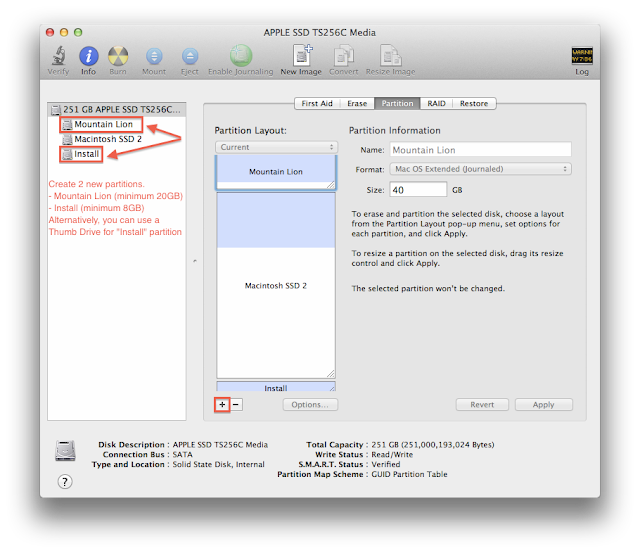
- 1 HDD, 2 Partitions; Name one Install (8GB) & ML (20GB>)


Full instructions:

1. OBTAINING A LEGAL COPY OF MOUNTAIN LION. (Skip to 2 if already done)


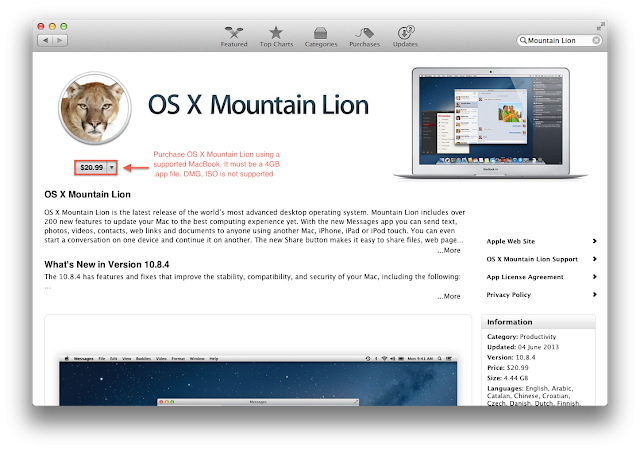
Picture 1A

1.1 Get a copy of Mountain Lion, please purchase the retail version of ML from the Mac App Store (refer Pic 1A).
1.2 ways to obtain it legally.
METHOD ONE
* Download Parallel Desktop 8 Trial, install Lion via Parallel Desktop. Once completed, buy Mountain Lion from the Mac App Store inside Parallel Desktop and copy it to your Applications folder.
METHOD TWO
* Get a supported Mac and buy it directly from the App Store, copy it to a thumb drive (8GB or larger) and transfer it back to the unsupported Mac.

[IMG][/IMG]

Video Tutorial Part One
1. Open Disk Utility, create TWO new partition. Name one "Install" (8GB) and the other "ML" (20GB>)


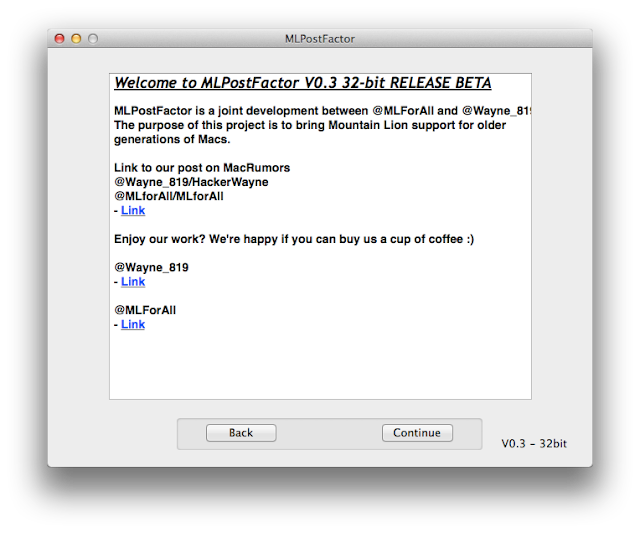
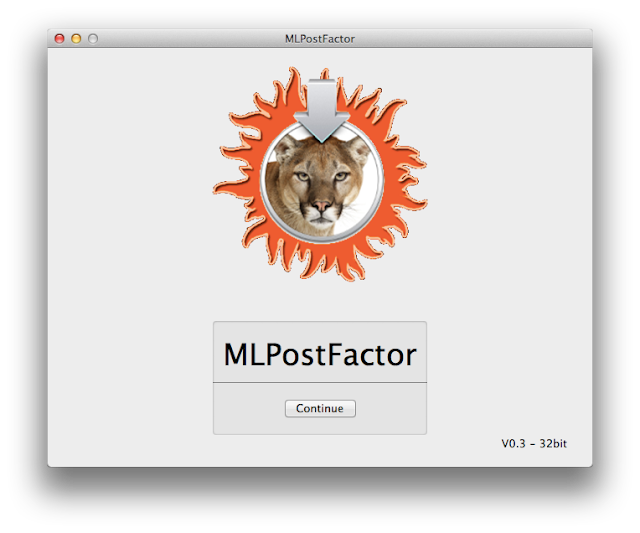
2. Open MLPostFactorv0.3 and click Continue.


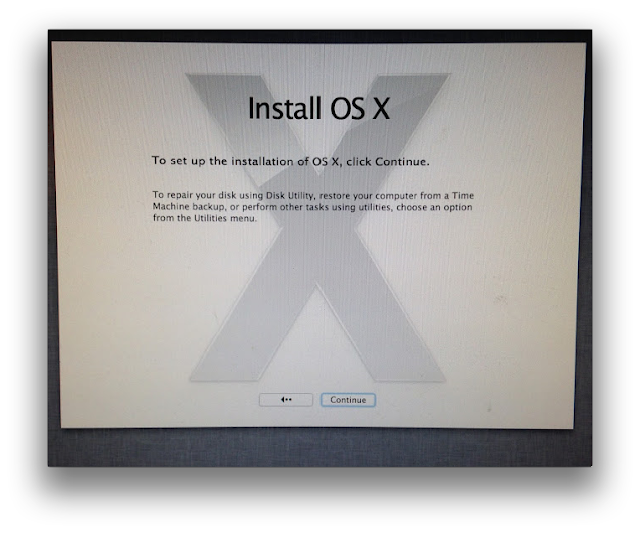
3. Click Continue again, and again.


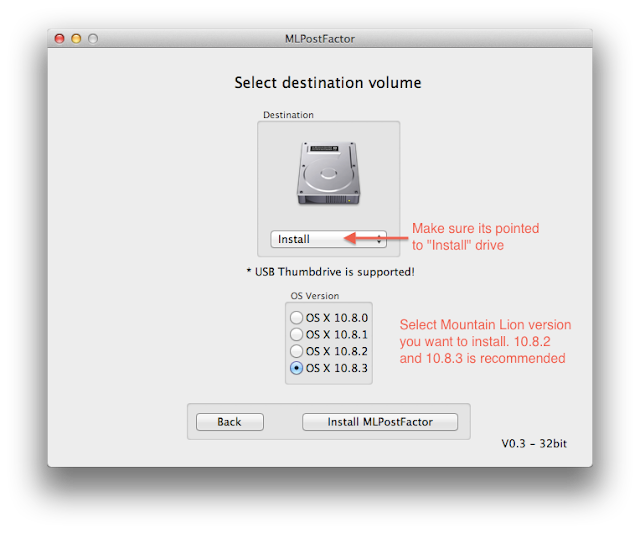
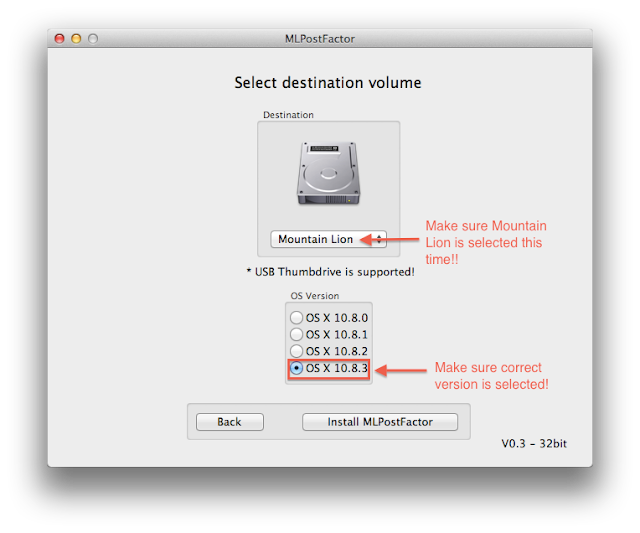
4. Make sure the drive is pointed to "Install" partition you created earlier and you selected the right version of Mountain Lion you're installing. 


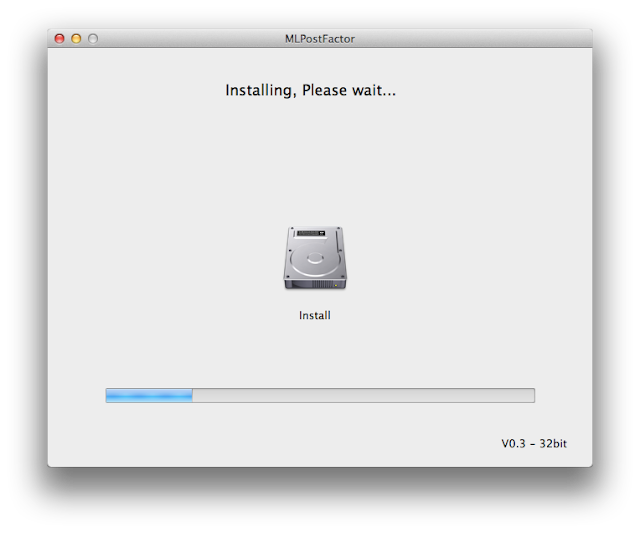
5. Just sit and wait, grab yourself a coffee when waiting as this will take about 15 to 20 minutes


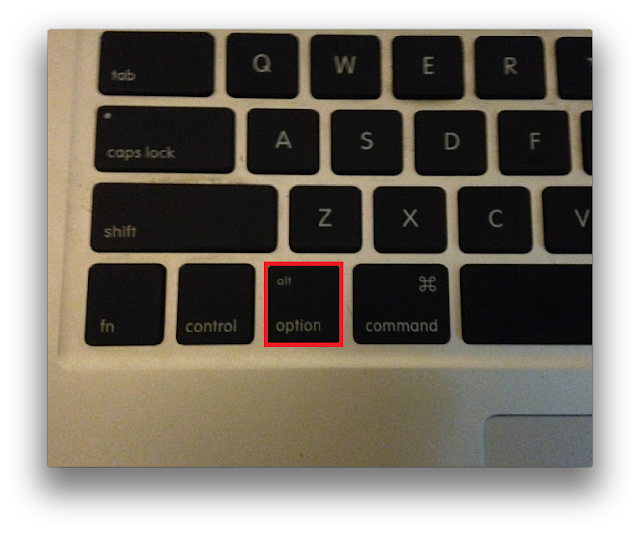
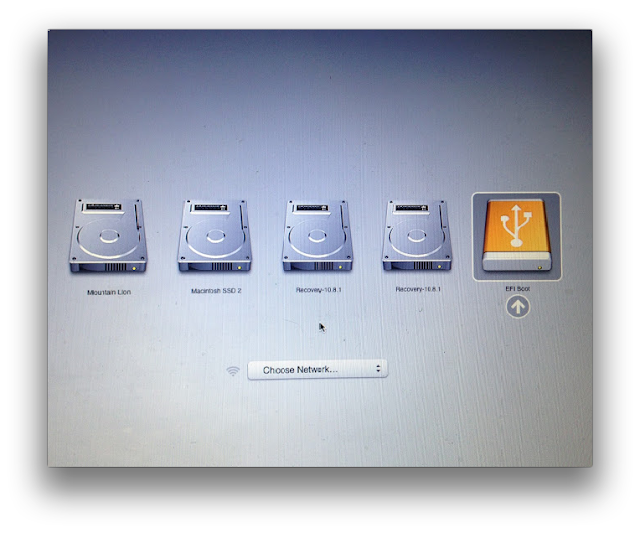
6. After MLPF Tool is completed, hold down "Option" and reboot into "Install" partition


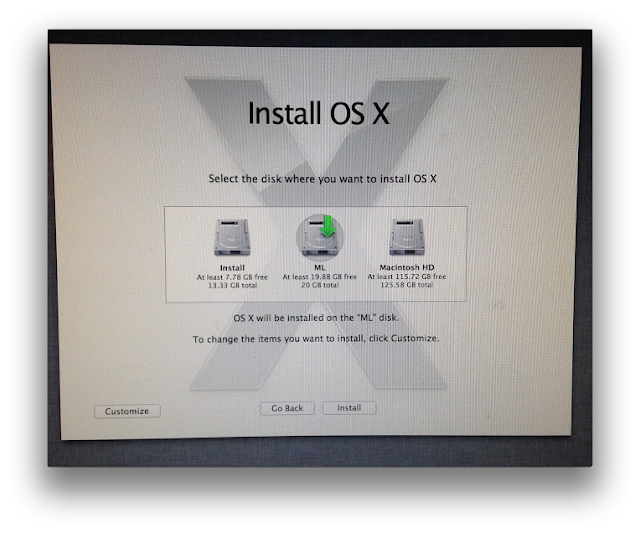
7. Install ML on partition named "ML".


8. You will get "Installation Succeeded" at the end of the installation.
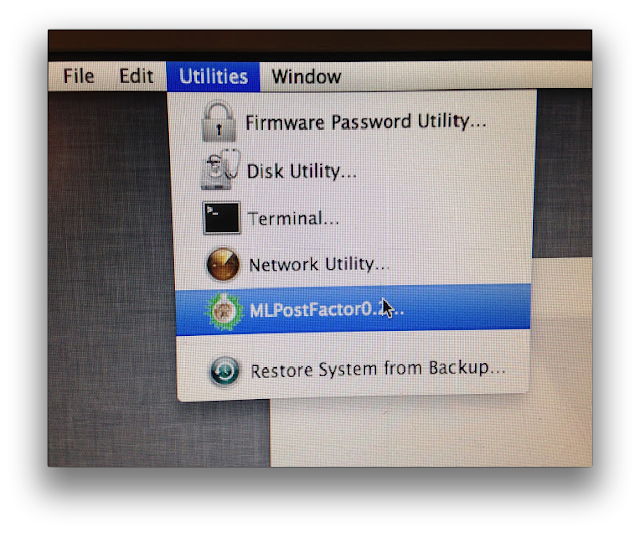
9. Go to Utilities, select continue, continue and select MLPostFactor apply it to the partition "ML"


10. Reboot into Mountain Lion
8. Enjoy!

MLPostFactorV0.3 Download Link
(For Macs with GMA950, GMA X3100, X1300, X1600, X1900XT, 7300GT & 7600GT Graphics)
Download Link #1 Direct Link
Download Link #2 Mega Download Recommended!
Share:

Clover_v2k_r2236.pkg #hackintosh

By Freirburro
Features

  • using UEFI BIOS or own CloverEFI

  • default boot after timeout into previous chosen OS

  • customizable GUI: themes support, own icons, fonts, background image, animated pictures, mouse pointers.

  • F1 - multilingual help, depending on language in config

  • saving preboot.log from GUI by typing F2 and system.log for debug

  • save original (OEM) ACPI tables by pressing F4

  • test DSDT patching with F5

  • save videoBIOS into EFI/misc by pressing F6

  • saving screenshots from GUI typing F10

  • CD/DVD eject by F12 and refresh menu after CD insertion

  • change GUI resolution by PgUp/PgDown

  • save BOOT0000 option to NVRAM (like bcfg in Shell)

  • call to Shell.efi

  • native screen resolution in GUI

  • scroll bar if screen resolution is too low for menu


source
Share:

Grey "Restart" Screen #Hackintosh

By Freirburro
Hey, I have finally been able to install OSX using Niresh 10.8.2, and I'm already having issues. After it installs and goes to reboot, it comes back... source
Share:

Start up problem - reset #Hackintosh

By Freirburro
Hi a have a problem with start os x , there is video OS X Snow Leopard start up problem - YouTube (http://www.youtube.com/watch?v=WFHf5VgAiX4) My... source
Share:

Patched HD 6870 10.9 GM #hackintosh

By Freirburro
Works HDMI=OK, 2 DVI=OK (normalement ) , DisplayPort=NO TEST


En espérant que sa fonctionne pour vous. ^^ source
Share:

ATI Radeon X1800XT 512MB #hackintosh

By Freirburro
These are the files i patched to have my Radeon X1800XT with 512MB VRam work with QE/CI working. In Lion Quartz 2D is enabled but in Mountain Lion only QE/CI is enabled.

Just use kext helper or next utility to install and reboot.


They are for X1800XT 512MB with user Device ID 0x7100. See Screenshotssource
Share:

AppleHDA for VIA VT1705-Test Beta_ #hackintosh

By Freirburro
this is an attempt to correct

AppleHDA for Via VT1705.

Install AppleHDA + HDAEnabler.

Let me know the results.source
Share:

Apple Sets Event Date for October 22, New iPads Coming #Mac

By Freirburro

Apple has sent out press invitations confirming the previously rumored October 22 event date. According to AllThingsD, Apple will unveil a new iPad and iPad Mini model, and likely provide a release date for OS X Mavericks and the new Mac Pro.


Apple October 22 invite


The new iPad Mini is rumored to have a retina display, while iPad 5 is expected to be thinner and lighter and have an aluminum chassis that is similar to the design of existing iPad Mini models. Both devices are said to run on the new A7 64-bit CPU that was introduced with the iPhone 5S.


The event invite, shown above courtesy of AllThingsD (no, we do not get invited to that stuff), is vague as usual, with a brief tagline saying “We still have a lot to cover.”, and the event itself will be held at Yerba Buena Center for the Arts in San Francisco.


If you’re in the market for a new iPad, iPad Mini, Mac Pro, or a new Mac in general, you may want to hold off a week to get more details about the new offerings. OS X Mavericks is a great improvement to the Mac operating system, the new Mac Pro should be very impressive, and the new iPad models will both be significantly improved as well. Stay tuned!


source
Share:

Prevent Zip Clutter by Moving Archives Automatically After Unzipping in Mac OS X #Mac

By Freirburro

Anyone who downloads files from around the web, ftp, torrents, and elsewhere will eventually wind up with a lot of archive clutter sitting around on their Mac in the form of tons of zip, rar, sit, and other compressed file formats. This is because the default behavior is set for archives to maintain their existence even after their contents are extracted, a reasonable but conservative setting that can cause users to forget about the original archive file(s).


Move zip files automatically after unzipping


Rather than having an unruly mess of compressed file containers scattered throughout the OS X file system, a better solution for many is to adjust the Archive Utility preferences to automatically relocate the origin archive to a central folder after the contents have been extracted, this insures you’ll only have a single place to look for archives and makes it much easier to manage.


  • Go anywhere in the OS X Finder, and hit Command+Shift+G to summon “Go To Folder”, enter the following path the box:


  • /System/Library/CoreServices/


  • Locate and launch the app named “Archive Utility”

  • Pull down the “Archive Utility” menu and select “Preferences”

  • Choose the menu next to “After Expanding:” and set it to “move archive to***”

  • Navigate to a directory that works for you, say ~/Documents/ and create a new folder, label it something like “UsedArchives”

  • Choose “Open” to set the newly created archive storage directory as the default of where all archives will automatically move to after extraction


Automatically Move Archives After Extraction in Mac OS X


Now anytime an archive has been expanded, it will relocate the original archive .zip file to that folder, keeping them in a central location. This makes manual archive backups simple, and also prevents you from having to dig around ~/Downloads/, ~/Desktop, ~/Documents/ and elsewhere to track them all down.


You may have noticed another much more aggressive option in the “After expanding” options that causes the archives to automatically remove themselves after expansion. That optional “delete archive” setting is typically best suited for advanced users because it’s unforgiving, which makes using the “move to” setting a better solution for most users.


This setting will apply to all archive formats managed by the native Archive Utility app. If you use a third party extraction tool like The Unarchiver to handle other file formats, you would have to set that separately to relocate those files to the same folder.


Going the other direction, you can also adjust the compression actions to relocate the origin files after having been zipped, though that is probably not a good idea for most use cases since it will relocate files automatically which goes against standard operating file system expectations.


source
Share: