 |
I have a amd system (Acer Nitro 5) and when trying to boot up i get stuck on this screen and cant get past it can someone help? [link] [comments] |

|
I have a amd system (Acer Nitro 5) and when trying to boot up i get stuck on this screen and cant get past it can someone help? [link] [comments] |
Hey everyone. My boyfriend gave me his old Dell 1564 and I was wondering if anyone could tell me if they’ve tried Hackintoshing this model and what they installed. It’s been years since I’ve done my last Hackintosh and I remember I’d gotten extremely lucky, coz everything worked perfectly. Of course I’ll try everything, but with work being extremely hectic lately, I was wondering if anyone could give me any pointers specific to this model so I can save me some time. Thanks!
VoodooHDA 2.9.1 SSE FULL Pack 2019 Edited & Fixed
Edited MixerValues %100
1- PCM %100
2- Rec %100
3- iGain %100
4- iMix %100
Edited Fixes
1- VoodooHDA Enable Half Mic Volume Fix
2- VoodooHDA Enable Half VolumeFix
3- VoodooHDA Enable Mute Fix
4- VoodooHDA Enable Volume Change Fix
 VoodooHDA 2.9.1 SSE FULL Pack 2019 Edited & Fixed
So I just got a new SSD and decided to install windows on it. I previously had windows on an old HDD so I decided to do a fresh install so that boot times would be better. During the installation process, I received errors but found a solution by unplugging all my other drives. Once, I finished the install I noticed that Clover did not boot, even if I made my boot priority in the BIOS to prioritize the SSD with Mojave on it. Everything from from the other SSD was functional up until I unplugged the drives. Additionally, when I go into my BIOS, the drive for the MacOS drive states that it was a "Windows Boot Manager" and I'm not sure if that is right. Not really sure what information you guys need to assist me but just trying to do everything to avoid a reinstall.
Everytime I call Apple Support I get a bunch of clueless reps who have no clue what to do.
I can login with other Apple IDs, just this one doesn't work.
I am trying to install Hackintosh and can’t get past the apple logo after booting a usb from Clover. Motherboard: MSI MPG Z390 GAMING PRO CARBON AC GPU: MSI RADEON RX580 8GB CPU: INTEL 9600K
I’m trying to get Mac to work on my laptop but have not found a good guide or efi folder for it. Could someone help me out with some guides?
I just upgraded to the latest Clover and 10.14.5. I changed my product model from imac18,3 to imac19,1 in SMBIOS.
I was under the impression that About My Mac would probably show that I have an i9 9900k but instead it shows "3.6GHz Intel Core i7".
Is this normal? Is there anything specific I need to do to make it detect my CPU correctly?
Thanks!
I followed guide on hackintosh complete guide but here is where I stuck
Hi all,
I've had a rock solid system for 4 years. I had to get a newer video card to run the new version of Element 3D (an After Effects plugin). Once I put in the NVIDIA GeForce GTX 1060 6GB, I lost dual monitor ability. I'm not sure where to turn, I've tried a lot of things online, but no luck.
Details:
Running Sierra 10.12.5
Intel I7-4770 Gigabyte LGA 1150 motherboard
16gb ram
Old Video Card: EVGA GeForce GTX760
New video card: GeForce GTX 1060 6GB
I tried to generate the boot log, but I don't know where it is on my system. I'm running clover based on Tonymac (I know, people aren't huge fans here).
Any ideas?
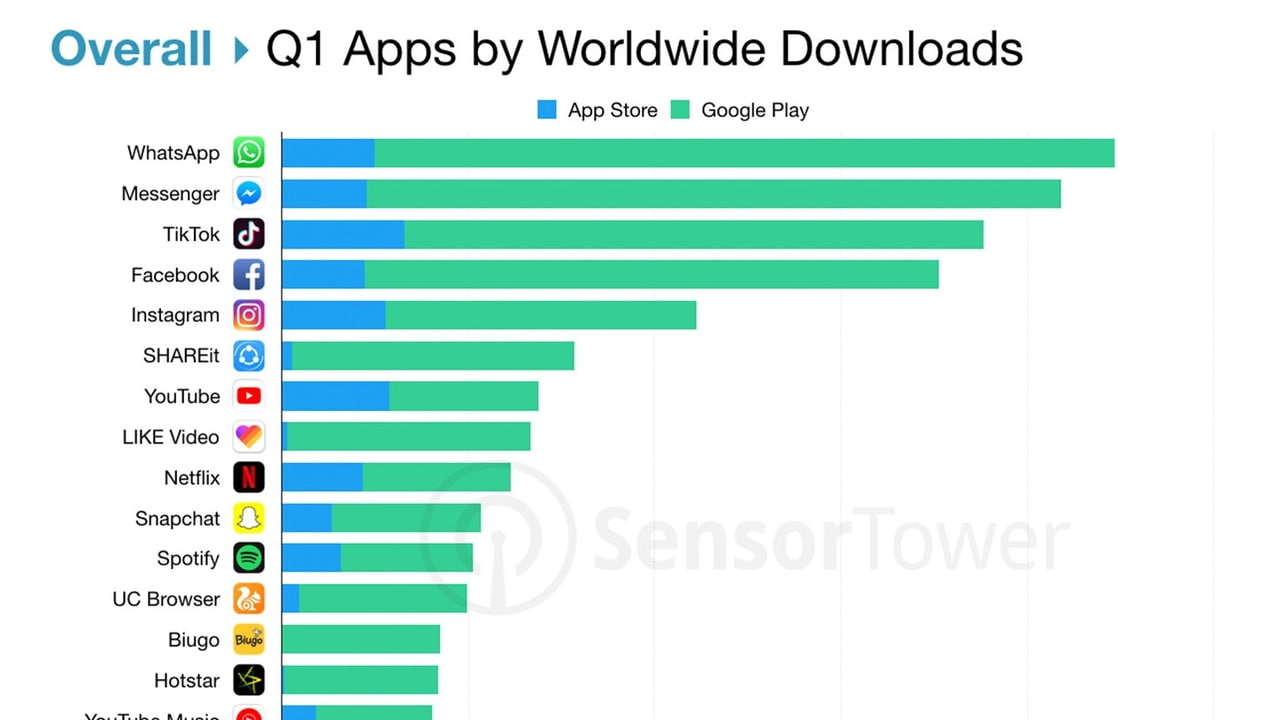

 Sensor Tower has shared its list of the most downloaded mobile apps worldwide in Q1 2019.

Hey guys. I have a Hackintosh with i7 4770k, Gigabyte Z87X-UD4H, 16GB RAM. I initially had an Nvidia GTX 650 Ti Boost and had been on Sierra for years, and this worked flawlessly. Then I tried to upgrade to Mojave and found out that my GPU was no longer supported, so I purchased an Rx 560. Everything seemed to work fine, except for waking from sleep. I get random kernel panics.
I've used the vanilla guide here, I've tried FakeSMC and VirtualSMC, I've reinstalled using guides at InsanelyMac, I've tried using a custom DSDT, I've tried messing with darkwake settings, I've tried messing with various hardware configs (14,2, 14,1, etc). Nothing seems to work. Still getting panics despite countless attempts to fix this.
Someone on Insanelymac said they couldn't get their motherboard to work either (Gigabyte Z87N-WIFI) due to panics on wake, and they had to roll back to Sierra and everything is perfect (had panics on High Sierra too).
So I'm suspecting that this has to be a motherboard compatibility issue. This brings me to my question: Is anyone using a socket 1150 motherboard with Mojave?
As it stands, I'm looking at either rolling back to Sierra and staying there indefinitely, which totally sucks... alternatively, I could try finding a used 1150 mobo and trying my luck there.
My modified Dell Optiplex currently sports an i5-3470 (Ivy Bridge), 16 GB of Corsair RAM, GTX 950, and an SSD for OS and HDD for storage. I'll soon be migrating to a dedicated custom built gaming PC and instead of selling this old thing I'd much rather keep it and put it to good use. Would the Optiplex system be able to support a working Hackintosh OS?
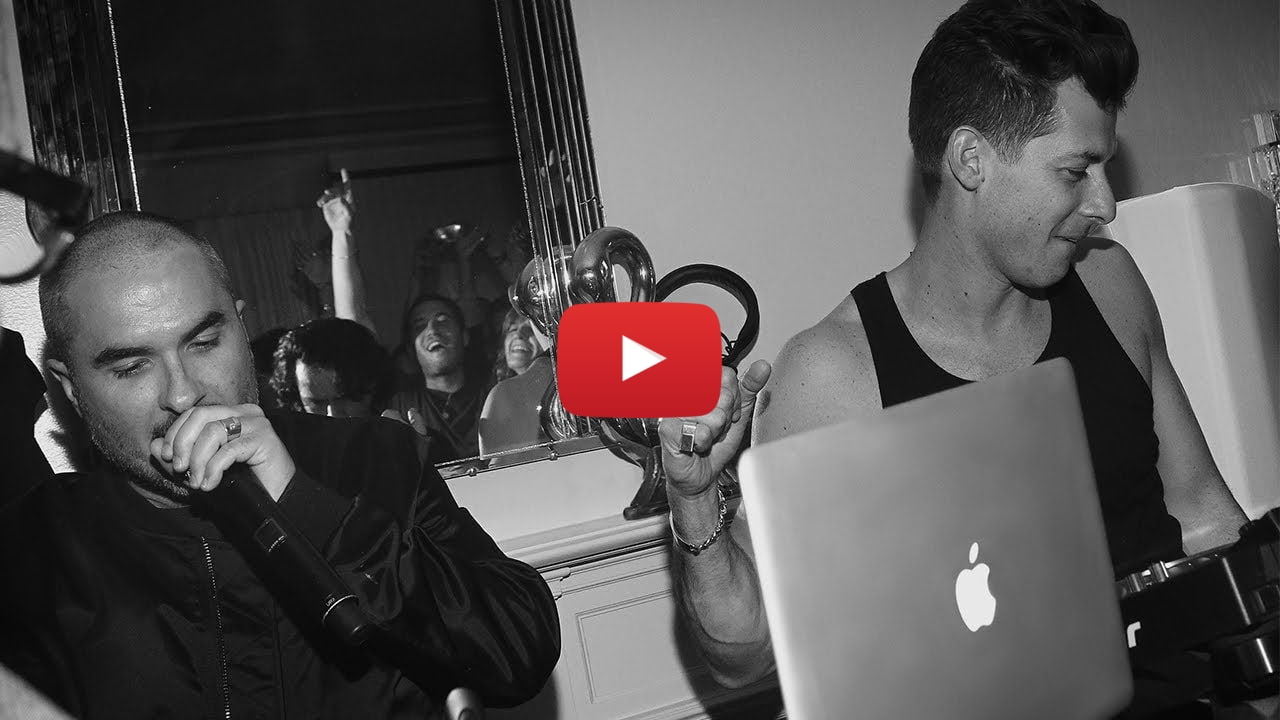
 Apple has posted a new ad entitled, 'Behind the Music. Behind the Mac'.
Hey all,
As title states, I’m having trouble even reaching the Apple logo to begin installation.
I’ll do my best to outline my steps.
That’s pretty much it.
I’ve tweaked stuff but it’s either the SMMSensors or no nvram variable found that’s preventing me from seeing the Apple logo. I’ve also tried to do a Unibeast install.. that did reach the Apple logo but it would freeze at the end.
Bios settings have also been adjusted to the recommended for the mobo.
Any help would be appreciated!

 Microsoft has posted the official reveal trailer for Minecraft Earth, an all-new augmented reality game for mobile.
Hi there,
I'm running out of options, so I have to ask for other input.
I had a Mojave system running for about a month and a half. RX580 in it, all good, didn't mess with any other hardware, didn't change anything other than upgrading to 10.14.4, and then re-applying audio kexts with KextBeast or whatever the utility is.
| mobo | Z77x-UP5TH |
|---|---|
| cpu | i5-3570K |
| gfx | Sapphire RX580 |
| install mode | clover, Unibeast |
Then after a forced reboot (power failure, backup battery was dead - swapped batteries since), my two screens would go blank after it got through the initial boot sequence (either verbose or just the apple logo and loading bar). The system is up, it runs services as it should, I can ssh into it, I can access shares.
What I cannot do is:
What I have tried:
What else do you recommend I try? Thanks!
Should i go with a ryzen 3 2200g and an rx 570 or should i wait for the navi gpus and ryzen 3000 cpus? And if I wait, how long will it take for drivers and support to arrive for the latest ryzen cpus and gpus. Any help would be appreciated. Thanks in advance.
Got Mojave working beautifully on my i5 7600/1080 build, BUT
When I boot from my alternate drive (windows 10), the time is wrong
I can’t get Nvidia drivers to work, any ideas?
Hey guys, so I have spent pretty much the past 2 days trying, and re-trying to get a fully stable system but I seem to have come unstuck getting my Nvidia graphics working. I am on 17G66 and have used the terminal command : bash <(curl -s https://github.io/webdriver 378.10.10.10.40.113 but it does not seem to do anything. If i boot from clover USB and check the Nvidia web driver box my system does not boot. I can boot by selecting the Mac OS drive directly. Think I have gone wrong again somewhere along the way but I am hesitant to start again as I have eveything else working great. It reboots and shuts down fine which was an issue for me previously.
Any help welcome :)
thanks
Hello,
I'm currently using Macmini 8,1 for my i5-8400 and Rx570 with everything works correctly. Is there any advantage with switching to iMac 19,1? and to do that I first need to sign out of iCloud, clear all iCloud-related cache and reboot, is that correct?
Hi. First of all I apologise if this is a dumb question or something inside a FAQ I couldn’t find. I’m new to this and this is my first hackintosh. Also, english is not my native language.
The problem is that, as you can see, my gpu is not detected properly (in fact, I changed its name, system initially detected 480)
I’ve tried with different versions of Mojave and got the same result. I’ve seen a post from tonymacx86 in which talks about possible solutions for High Sierra such as using a kext called AMDRadeonX4100 which I neather found in Extensions folder nor available to download.
I also played with different kexts (specifically lilu and whatevergreen among others) from multibeast and other kexts managers, but nothing changed.
I installed Hackintosh from olarila image, on motherboard Asus P8H77-V LE with i5-3470, which is Ivy Bridge as far as I know.
Thanks a lot.
I wanted to install Mojave or High Sierra on my X230 (which has the standard Centrino N Wifi/Bluetooth card) and to get the wifi to work I'd have to get an USB adapter or get one of those azurewave cards (which go from 35 to 60€ already) and aren't supported on the X230 without spending even more money to flash the BIOS and remove the hardware whitelist (fucking thanks lenovo)
However, I remembered that this thing actually has a PCMCIA slot and I thought that maybe I could get some use out of it. Are there any PCMCIA WiFi cards that are supported/work on Mojave or High Sierra ?
I’ve given up waiting for Nvidia’s drivers and I want to be able to upgrade to Mojave and whatever’s next/coming out at WWDC so I bought a Vega 64. My system is currently completely stable and working just fine so I’m a little wary of messing with it but I think I’m ready to troubleshoot.
That said, I’d prefer things go smoothly.
1) To that end, what do I need to do to make the swap successfully? 2) Do I need to change any settings before pulling the 1080? 3) Do I need to do anything after or is it just plug and play? 4) How do I fully backup my system prior to upgrading to Mojave in case something gets screwy?
Thanks! Anyone want a very lightly used 1080? It’s the EVGA FTW version. Only around 8 months old with some mild fortnite gaming. Never mined. PM me.
My specs
Ryzen 5 1600 16 gigs ddr4 ram Gtx 1070 strix gpu B350m pro vdh msi mobo
My questions -
Is it true that if i alredy have windows installed , i need to clean format hard drive to dual boot macos and windows
3.i have to use mainly for xcode , so what will be better. Use a virtual box or install full on hard drive ?
Well this is an odd one. Sometimes when I copy (Cmd C), it seems as if it doesn't actually copy to the pasteboard at all. Same if I cut (Cmd X). I will attempt the cut/copy, then paste, and nothing will happen except getting the annoying sound that occurs when the pasteboard is empty. This never happens on my Macbook Pro or my previous hackintosh install. Any ideas what's going on and how to fix it? I'm pretty much assuming it's a hackintosh issue rather than a general macOS one.
Note: it will work after 2-3 times. Sometimes even after the 1st, but often not.
For reference, my specs:
i7 9700k
Vega 64
Aorus Z390 AORUS PRO
I've never done benchmarks before, was just curious which things I could/should run. I don't have a dgpu though. Kinda wanna test write speed for my ssd, and whatever else that'd be important
I'm trying to switch from my GTX 1050 to integrated graphics to upgrade to Mojave. I'm currently on High Sierra.
Previously, I has a dual screen setup using the HDMI and DVI ports on my GPU. Now, I'm trying to get it working with the motherboard HDMI + VGA ports.
The HDMI screen works fine, but the VGA screen doesn't work. It receives no signal. Both screens come up in Hackintool. If I boot with only the VGA screen plugged in, the verbose boot log shows until the point where the login screen should come up. Then it stops receiving signal. To my understanding, I need to add some `framebuffer-conX-...` properties to get the VGA screen working. What properties and values do I need to add? Or do I need to do something else entirely?
I have a Dell Inspiron 3668, which has a Intel H110 motherboard.


![[link]](https://i.redd.it/h43isvfy0uy21.png)
![[link]](https://i.redd.it/28apbzoxgry21.jpg)
