Well, the question speaks (or asks) for itself. In the sense of maximum utility from Hackintosh.
[link] [comments]

Well, the question speaks (or asks) for itself. In the sense of maximum utility from Hackintosh.
 |
Hi, I have upgraded from Mojave 10.14.6 to Catalina 10.15.2, and suddenly I saw that my wifi isn't working. I checked through google, and forums but didn't find how to solve this problem. Pls help me to get my WiFi work My kexts folder: [link] [comments] |
I wanted to play some newer games on my HTPC hackintosh but I had an MSI RX 480 4GB that was aging and wanted to upgrade to a 5700 XT. Bought the Gigabyte Gaming OC 8GB version. Purpose of this post is to laugh at myself, jot some notes down, and help anyone in the future who has this motherboard or similar problems.
Specaroos
Pre-work
What I should have done
What actually transpired
I also did a lot of other junk like disabling onboard audio and AppleALC.kext since I never really use onboard audio this seemed reasonable. Fiddling with the IGPU settings in BIOS, and many more useless things. All told, took me about 3.5 hours to figure everything out.
I hope someone in the future finds this to be helpful.
The third gen threadripper chips have been out for a "while" now, and on the official
amd-osx website, it is stated that it will boot but has chipset issues, and won't work very well.
Is there any update to this, or will there be an update to this in 2020?
Some background:
I am building a hackintosh with a 1080ti, high sierra 10.13.6 for light tensorflow training on macos, just in case I lose access to my campus's gpu cloud. (I had this problem before, and it wasn't fun. I will lose it when I graduate too, which is also not fun!)
I also want a lot of cores due to some other operations I will be performing. Thus the decision to build with threadripper. The hack won't be built for a year or so, so I was wondering about its future.
Hey!
I recently bought an RX580 pulse GPU, for my High Sierra hackintosh system. My problem is, that memory runs 2.000mhz all the time, and the idle power consumption is 90W. How can I lower it? What could possibly cause this?
Thank you!
Hi guys,
Im running HS olarila in my desktop with i5 6600 with no any eGPU.
its working perfectly, except with sleep and one issue. every single minute, theres a warning code in my console:
iMac com.apple.xpc.launchd[1] (com.apple.displaypolicyd[1040]): Service exited with abnormal code: 1
iMac com.apple.xpc.launchd[1] (com.apple.displaypolicyd): Service only ran for 0 seconds. Pushing respawn out by 10 seconds.
is it okay? Im afraid if my hardware will brick lol
Thanks
Hello, I am able to install Catalina 10.15.2 on thinkpad P53s using vanilla guide (already patch HD620 iGPU), but there is no graphic acceleration. Here is my EFI, please give me some help.
EFI: https://www.mediafire.com/file/o3clnv3h678r6mr/P53s_catalina_EFI.zip/file
For dGPU, I already disable it follow this guide: https://www.reddit.com/r/hackintosh/comments/bu1wf8/how_to_disable_your_unsupported_gpu_for_macos/
Thank you and good day.
Hardware:
CPU: Intel Core i7-8665U Processor (1.90GHz GHz 8MB)
GPU: NVIDIA Quadro P520 2 GB GDDR5/ intel UHD 620
RAM: 16.0GB PC4-19200 DDR4 Soldered 2400MHz
SSD/ HDD: 1TB SSD Samsung PCIe
Motherboard/Laptop model: Intel Coffee Lake-U/Y PCH rev. 30/ Thinkpad P53s
BIOS: Lenovo version 1.60 (12/30/2019)
Screen: 15.6 "FHD IPS AntiGlare LED Backlight 1920x1080
Ethernet Card: Intel I219-LM
Wifi/BT Card: Wireless Intel AC adapter 9560 2x2ac with BT5.0
Hello everyone! Recently I bought Sapphire Rx 590 Nitro+ 8 GB. It am trying to couple it with Catalina. But getting black screen. My configuration is:
I5 9600k
Gigabyte Z390 Aourus Elite
Gskill DDR4 3200HZ 32GB
Samsung NVME 970 plus 500 GB
Corsair VS550 power supply
Thank you!
Pictures: https://imgur.com/a/3nFGmwg
After dreaming about building a Hackintosh for quite literally almost a decade, I finally got the time (and money) to do it. There were a few hiccups but overall, it was so much easier than I anticipated and saved me thousands! This baby screams compared to my old 13-inch MacBook.
Overall, this was a very easy build! It's the first computer I have ever built and I'm very surprised I didn't muck anything up too bad. I'm excited to have a Mac whose components I can actually upgrade when I want to – and for much cheaper than Apple.
I'm very happy I went with mini-ITX even though it was more expensive. I prefer the look of a smaller case/build immensely. I love my Core V1 case and can't recommend it enough.
Next stop, perhaps venture into overclocking?
OpenCore: OpenCore was a lot of information to grasp, after poring over the guide for a few days I feel like it actually isn't that difficult and I understand most of what is happening with my config. If I had done Clover, I probably would have just copied someones config and wondered why something wasn't working when something went wrong. I've never used Clover but I have a lot of confidence in OpenCore – it feels more native and future proof (and I've heard it boots a lot faster than Clover too).
Thank you to /r/hackintosh, the incredible OpenCore Vanilla Guide, the InsanelyMac forums, and the tonymacx86 forums for making this possible!
Hello Hackintoshers,
I'm new to the Hackintosh scene and I need help! I've come across a problem creating an SMBIOS/System Identifier. Based off the OpenCore Vanilla Guide; I'm supposed to make an SMBIOS using GenSMBIOS to generate one. Every time I generate a SMBIOS (for iMac14,1), the serial number comes out as invalid/not a serial number when I enter it on Apple's Check Coverage website. I have done this more than 20 times, and I still get the same result. The guide says I need to have a serial number that shows up as "Purchase Date not Validated" when entered on the Check Coverage website. What can I do at this point? Is it okay for me to continue on with an invalid serial number? Is there another application I can use to get a working one?
Thank you all so much.
Specs:
- Alienware X51 R2 -
Intel® Core™ i7-4770 (Quad Core, 8MB Cache, up to 3.9 GHz w/ Turbo Boost)
Intel® H87 Chipset (Intel® DH82H87 PCH)"Shark Bay"
8Gb (2x4 Gb DIMMS) 240-Pin DDR3 SDRAM
512 GB Samsung SSD 850 PRO
6x DVDRW/BD-ROM drive - Can read/write CD and DVD but can only read Blu-ray Disks.
Realtek Integrated 10/100/1000 Gigabit Network Card
Integrated Realtek ALC892 Codec
AMD Radeon HD7870 2GB (Shows up as 7800 series in windows)
Hardware: CPU: Intel 8700k stock
GPU: Sapphire Nitro+ RX 580 8GB SE
RAM: 32 GB (2x16 2666) Patriot Viper
Motherboard/Laptop model: ASUS Prime z370-a II
Ethernet Card: MOBO
Wifi/BT Card: N/A
Display1: AOC U2879VF 28" 4k (via RX 580 DisplayPort)
Display2: BENQ GW2250HM 21" 1080p (via RX 580 HDMI)
Guide: OpenCore Vanilla guide [https://khronokernel-2.gitbook.io/opencore-vanilla-desktop-guide/]
EFI folder: [https://www.dropbox.com/s/edzzhkhrz8qwnj7/Screenshot%202020-01-31%20at%2013.07.38.png?dl=0] [https://www.dropbox.com/sh/0jdt4ggqrhr48is/AACtU45NwtEeyagF7ae7aUYwa?dl=0]
Having spent quite some time researching parts for this build, aiming for decent mid-range power (audio production + light video work) with maximum OTB compatibility... It has not been an easy journey over the last few days.
After following the OC Vanilla guide and going round in circles stressing over the ACPIs, DeviceProperties and Platforminfo, the majority of my troubles seemed to have stemmed from my display configuration (BIOS and config.plist).
My BIOS is currently configured to preference the GPU, but have the iGPU on for multi-monitor support (afaik this is important for FCPX if I want to get the most out of the GPU and the on board for both hardware accelerated rendering and scrubbing etc?)
My smbios is set to 19,2. My Deviceproperties is set the the Coffee Lake one where nothing is plugged in to the iGPU
MAIN ISSUES:
My 4k display outputs black except when set to one particular resolution: 2560x1440 (low resolution). Anything else and it remains black (but not without a signal), and the other screen flashes on and off periodically. Both are detected perfectly in Display preferences, and also via screensharing.
When booting, neither display gets a signal until after the OC bootpicker. I had installed via a different display setup (HDMI only via the iGPU) as this was the only way I could see all the output on the screen.
Any help would be much appreciated! Also, any input on smbios (I've read so much conflicted information), and optimum hardware acceleration would be fantastic. i.e., what should I ideally see in the VideoProc settings page? (currently this: [https://www.dropbox.com/s/fimiw75yi61b970/Screen%20Shot%202020-01-31%20at%201.26.55%20pm.png?dl=0])
Thanks to anyone in advance! I will update any info if I've forgotten anything!
I'm trying to install Catalina on my t480, I got past the installer using this EFI (modified).
But on boot I'm getting the attached error.
I'm installing to an external ssd and I added a 2nd 8gb stick of ram to the laptop. I'm thinking its because of the extra ram possibly? Do I need to generate a dsdt or dsdt file for this? I already added both 8gb sticks to the smbios config in the clover configurator.
Unless you guys think it's something else...
Hey all,
I have two SSD's and two HDD's in my system and I am only using one SSD and one HDD for Windows, so I want to use the other SSD and HDD for a Hackintosh set up.
My specs are:
Ryzen 5 3600
16 GB of DDR4 RAM
RTX 2060
If anyone could let me know the process or whatever I need to do install in order to make this work (along with what would work? iMessage and stuff or no?) I would greatly appreciate it.
TIA
Hey installing Catalina with the fewtarius laptop guide, I finally got to the set up stage. When I select English the screen goes grey for 1-2 min and then comes back to the language select screen, I’ve tried 3 or 4 times and everytime it’s the same. Only thing I saw to do with language in the config says en:0 is that right? Any suggestions?
Hi all, I'm using MacOS High Sierra on my PC without any problem. but now I want to have a cheap R9 270X to run macOS Catalina. Is there any problem so far or anything hard to fix when using the XFX R9 270X with lastest macOS?
P/s: Can I put 2 GPU, 1 from AMD, 1 from Nvidia on my motherboard then choose AMD to run on Hackintosh, and Nvidia to use with Windows?
So I've been messing with booting Opencore on my pc and I have made the installer. I have tried making this in both macOS and in Windows. When I select the installer nothing shows up and my monitor stays on a grey screen; I've attempted to leave this running for some times but nothing appeared. But when I boot the Hackintosh Volume I previously made using a clover install it works just fine. I have tried the guides troubleshooting steps but to no avail for me. I would appreciate any help with this!
Specs:
MB: Gigabyte Z390M Gaming
CPU: i5-9400f
GPU: Rx 5700
System Specifications:
CPU: Intel i5-4440 (4th Gen)
RAM: 8GB DDR3 1600Mhz
iGPU: Intel HD 4600
dGPU: GTX 1050
HDD: 500GB Toshiba
I had installed Hackintosh but can't boot to OSX without USB stick, also system is not int the File Explorer when I'm opening to see it ( I mean in the left side where are regularry all disks )
Clover has 198 MB free space, which 178 is free
What should I do to boot without USB stick ?
Hi! I recently tried to make an installer for my hackintosh(specs below). I successfully created everything I made my own config.plist and everything what needed. Then I setted the boot order in BIOS but I booting in windows directly. I checked my BIOS settings but everything is ok. What can I do?Thanks in advance!
Specs:
My Mac just crashed hard. I have a snow leopard 10.5.8 install disk. Need the 10.6 update to go further.....what can I do? Anyone can help me...? I'll send you a Godzilla.
Hi there, I followed this guide https://hackintosh.gitbook.io/-r-hackintosh-vanilla-desktop-guide/ and I wonder what I have to do after? Is there any guide to follow up?
Also, on some site I found that I should create a DSDT table Link. Should I skip or do this step?
Like it says in the title I had tons of success with the Designer TB3 golden build on TonyMac. Everything works flawlessly. However, my main purpose for building this machine is for transcoding footage. I'm currently using Silverstack Lab to do this and I'm getting a weird result. [Video Link Here.](https://streamable.com/0htck)
Additionally, I've transcoded the same footage with Handbrake and it worked fine. So I'm fairly certain its Silverstack. Any help is appreciated. I have no idea what could be causing this.
I can't understand this part of Opencore Vanilla Guide. Does SSDTTime support Z370 to create the dump or not? Thanks
Hey /r/hackintosh,
I'm trying to get Catalina 10.15.3 installed on my machine using OpenCore but I keep running into the same issue no matter what I change. I am able to boot into the installer, format my primary SSD to APFS, and start the installation. When my system reboots and I select the drive that I began the installation on, it loads to the apple logo with the loading bar where it sits for a few moments before displaying verbose output and powering off my computer entirely. Here is a video that shows what happens.
My Specs are:
CPU: Ryzen 5 2600x
Motherboard: ASUS ROG CROSSHAIR VII HERO
GPU: MSI RX 5700 XT
I have uploaded my OpenCore EFI configuration here.
The boot args I currently use are: -v debug=0x100 keepsyms=1 agdpmod=pikera npci=0x2000
The correct AMD patches were added to my config.plist and I've made sure the proper SSDT fix for the EC issue is in the correct place as well.
I would appreciate any assistance getting this resolved and if there is anything I need to change/update please let me know.
Thank You!
 |
✅ What's working:
❌ What's not working:
[link] [comments] |
Today I have completed my first attempt at a Hackintosh and am excited to report back. Thanks to the guides found online, it was more reading than troubleshooting.
Specs:
CPU: Intel i7-8565U (8) @ 1.80GHz
GPU: Intel UHD Graphics 620
Ram: 8GB
Storage: 256 NVME SSD (MAC), Samsung 1TB EVO SSD (Windows)
The Kexts and EFI folder used were found from this guide:
https://github.com/daggeryu/DELL-Inspiron_5488_5480_5580_5482_5582_Hackintosh
Following the Chinese guide via google translate was at times difficult but what it really came down to was making a Vanilla copy on a USB, Partitioning for clover, copying EFI, then running the .command files found in ALCPlugFix folder. Just want to thank the mackintosh community for providing support and detailed guides! Hopefully this can help someone else with similar specs to mine. :)
Everything but Sleep & Wifi work but my DW1820A is arriving shortly.
if anyone has any suggestions as to helping wake up after Sleep mode, all input it greatly appreciated!
So, I'm using my Hackintosh as a daily driver since it runs really stable and has most of the things working. Now I'm at the point of needing to make backups.
What's the best way for a hackintosh to backup? Is Acronis disk imaging overkill? Is Apple's Timemachine fine? Or is there anything else you guys use?
Let me know! Thanks in advanced :)
Here is my current plan, any foreseeable issues?
Gigabyte Aorus Master z390
i9 9900k
Radeon VII
64 gb Corsair Vengeance 3200
3x Evo 970 plus 1Tb
Corsair RM 1000i
FCPX, Capture One Pro, Photoshop, After Effects, and Motion 5.
These are what I use with Mac but I wonder if Ryzen still runs those software or not?
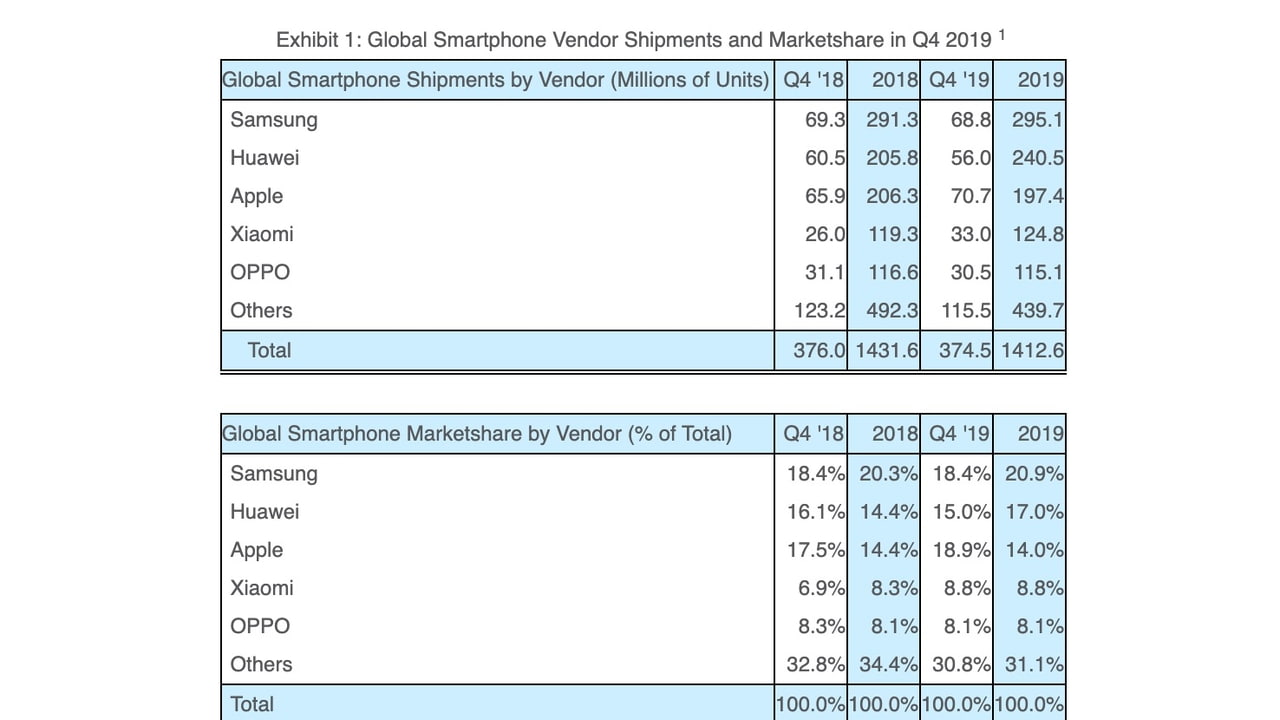

 Apple was the world's number one smartphone vendor in the fourth quarter of 2019, reports Strategy Analytics.

Motherboard: Gigabyte Z390 I AORUS PRO WIFI
i7 8700
5700xt Nitro+
Catalina 10.15.2 w/ Clover 5103
I rebuilt my computer, and for some reason the BIOS settings were reset. I set things up as I remembered, but I'm running into some problems.
My USB has the same EFI folder as my Hackintosh SSD (APFS), and I can boot into Hackintosh from this USB, but I'm unable to do so without the USB.
I've tried reinstalling Clover on my SSD but the BIOS is still not detecing the UEFI partition on the SSD. Any ideas?
SOLVED Had to add my CLOVERX64 to the boot options
https://www.tonymacx86.com/threads/solved-uefi-clover-boot-option-gone-after-bios-update.211715/

 Apple and Broadcom have been ordered to pay the California Institute of Technology $1.1 billion for infringing its patents on Wi-Fi technology, reports Bloomberg. Apple must pay $837.8 million and Broadcom must pay $270.2 million.
![[link]](https://i.redd.it/7iau2jqpp1e41.png)
![[link]](https://i.redd.it/5dqvfwn2g1e41.jpg)
![[link]](https://i.redd.it/xzq00z2hz0e41.jpg)

![https://www.dropbox.com/s/fimiw75yi61b970/Screen%20Shot%202020-01-31%20at%201.26.55%20pm.png?dl=0]](https://www.dropbox.com/s/fimiw75yi61b970/Screen%20Shot%202020-01-31%20at%201.26.55%20pm.png?dl=0%5D)
![[link]](https://i.redd.it/621oxummr0e41.jpg)

![[link]](https://i.redd.it/9vl4x1zzm0e41.jpg)
