Loading...
Loading solutions...
How to get a Boot Camp Partition on iATKOS L1
Image
If you do, you might be receiving a message that's telling you "This disk cannot be used to start up your computer." Well, of course it can, but iATKOS L1's just being annoying. To fix it, you just open up Disk Utility (Hard Drive -> Applications -> Utilities), choose your hard drive, click the Partition tab, and resize your Mac partition to be 128MB smaller. Click Apply and you should now be able to install iATKOS L1 without issue. (If you want you can resize it back when you're done.) For the fully-illustrated instructions CLIC HERE .
fix
Mac OS X Lion Cache Cleaner [ New for Lion ]
Image
Lion Cache Cleaner is an award winning general purpose tool for Mac OS X. LCC makes system maintenance simple with an easy point and click interface to many OS X functions. Novice and expert users alike will appreciate the powerful toolset LCC provides. Lion Cache Cleaner is installed on thousands of personal and business systems around the globe. Maintenance Lion Cache Cleaner is a one stop solution for all of your OS X maintenance needs. Intel or PPC, Tiger or Lion, LCC has the tools to keep your system running at its best. LCC Documents and the LCC Engine maintain system health by providing full automation of common maintenance chores including virus scanning of internet downloads. The LCC Engine can even repair permissions automatically after software installations. With the LCC Engine, powerful system maintenance and antivirus can be completely transparent or as close as your menu bar. Optimization Lion Cache Cleaner can improve system performance by tuning internet and fil...
TonyMac Rocks! [ UniBeast: Install Mac OS X Lion Using an All-In-One Bootable USB Drive ]
Image
Introducing UniBeast- our new tool to create a bootable USB drive from your Mac App Store purchased copy of Install Mac OS X Lion or Apple Store purchased OS X Lion USB Thumb Drive. This all-in-one bootable USB drive can also be used as a rescue boot drive for system recovery. UniBeast + MultiBeast is the easiest method to do a clean install of Mac OS X Lion or update any Snow Leopard system. The following guide requires no coding, terminal work, or Mac experience of any kind. FOR MORE CLIC HERE
How to Install Lion OSX (Basic Guide)
Image
Having hardware trouble after installing Lion OSX? You need to understand that not all hardware will work out of the box. So, you'll need to use Injectors, which basically are modified kexts, so that your hardware might work. Most Ethernet card won't work out of the box, so you need to find out your network card id device number and the injector compatible with it. The same apply to others hardware. Be aware that Intel wireless cards are not compatible with OSX, you might try to replace it with other wireless card compatible with your system and OSX.  If you have any trouble Replacing The Packages files from Lion OSX to the new image.dmg make sure that the new image the you had created has 4.6 GB (DVD-R, DVD-Ram) of size (as is shown in image 2), otherwise it won't let you replace them and you will get an message saying that you don't have enough space available. Always double check the instructions below.  One thing you might want to know before you read or start insta...
Apple Intel HD Graphic Kexts
Image
Here are some Apple Intel HD Graphic Cards tested on iATKOS S3 (Snow Leopard).   Remember to BACKUP your system before installing a new Kext. AppleIntelHDGraphicsFB.kext – 0×00468086 0×00428086 (It is the framebuffer) AppleIntelHDGraphics.kext – 0×00448086 0×00468086 (it is the accelerator) These dev ids is for: 0042 Core Processor Integrated Graphics Controller (clarkdale’s (desktop) core i3/i5 gpu) 0044 Core Processor DRAM Controller 1025 0347 Aspire 7740G 0046 Core Processor Integrated Graphics Controller (it’s probably arrandale’s (mobile) core i5/i7 gpu) One more thing. The system check shows tho device ids known as Graphics adapter 0×2a42 and 0×2a43. There is also 0×2a40 or some, that is known as some bridge or some. NVinject.kext.zip  (Added to the Blog on 05/01/10) AppleIntelHDGraphics.kext  (New) HD's posted on 06/20/10 AppleIntelHDGraphicsFB.kext.rar AppleIntelHDGraphicsGA.plugin.rar AppleIntelHDGraphicsGLDriver.bundle.rar AppleIntelHDGraphicsVADriver.bundle.rar...
DOWNLOAD iATKOS L1 (TORRENT)
Image
>>>>   GO TO DOWNLOAD     <<<< md5 of iATKOS_L1.dmg >>> 2911ae8bab1cd04610690a4f55a0056a You can get iATKOS L1 by the torrent link above - Burn the dmg image to a blank 4.7GB DVD (±R ,±RW) using Disk Utility or another burning application on OS X and then you are ready to boot with the DVD. or - Restore the dmg image to a USB media and install chameleon to it (google is your friend) then boot with it. - Windowsers can burn the dmg to 4.7GB DVD using Transmac or - Use x-flash or some other applications to restore the dmg to USB media, then install chameleon bootloader to it (google is still your friend) then boot with it. Thanks to UPHUCK TEAM  在PC上 安裝 Mac SOURCE
DOWNLOAD iATKOS L1 (DIRECT LINKS)
Image
>>>>   iATKOS L1     <<<< md5 of iATKOS_L1.dmg >>> 2911ae8bab1cd04610690a4f55a0056a You can get iATKOS L1 by the torrent link above - Burn the dmg image to a blank 4.7GB DVD (±R ,±RW) using Disk Utility or another burning application on OS X and then you are ready to boot with the DVD. or - Restore the dmg image to a USB media and install chameleon to it (google is your friend) then boot with it. - Windowsers can burn the dmg to 4.7GB DVD using Transmac or - Use x-flash or some other applications to restore the dmg to USB media, then install chameleon bootloader to it (google is still your friend) then boot with it. Thanks to UPHUCK TEAM  在PC上 安裝 Mac SOURCE
How to install iATKOS L1 on Portables (Guides)
Image
iATKOS L1   md5 of iATKOS_L1.dmg >>> 2911ae8bab1cd04610690a4f55a0056a You can get iATKOS L1 by the torrent link above - Burn the dmg image to a blank 4.7GB DVD (±R ,±RW) using Disk Utility or another burning application on OS X and then you are ready to boot with the DVD. or - Restore the dmg image to a USB media and install chameleon to it (google is your friend) then boot with it. - Windowsers can burn the dmg to 4.7GB DVD using Transmac or - Use x-flash or some other applications to restore the dmg to USB media, then install chameleon bootloader to it (google is still your friend) then boot with it. Thanks to UPHUCK TEAM 8) 在PC上安裝 Mac source
List of Motherboards tested for iATKOS L1 (10.7.2)
Image
We recommend before your first installation of iAtkos, be sure about your hardware details. You can find your own at  osx86 Wiki Remember, use hackintosh by your own risk :)
Compatibility to OS X Lion?
Image
"To get along with others ah." You have this computer.  With OS X, you can use Microsoft Office, with most printers and cameras connected to the network by adding PC can even run Windows. Want from your PC to the new Mac?   With OS X, you can from your old PC to transfer all the information on your new Mac.   OS X built-in Windows-to-Mac migration feature that automatically transfer your documents, music, contacts, calendar and e-mail accounts (Outlook and Windows Live Mail), and into their new folder on the Mac and the appropriate application software.   It's that simple.   If you have an Apple Store to buy a new Mac, our private setting service can help you successfully enabled Mac.   If you have a One to One membership, an Apple Genius genius can even transfer your files from your PC, and recycle your old PC. Industry Standard founder OS X supports industry standards, and almost all of the email service providers and Web site compatibility.   You ca...
GT220 NVEnabler64 (For 10.7)
Image
Download Made by kexts.com
How to remove the function FrontRow
Image
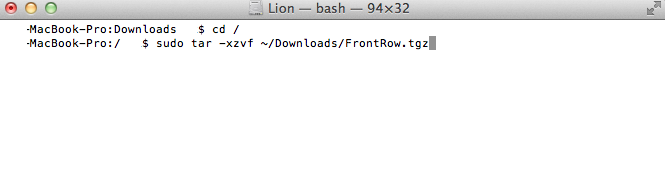
 Apple Mac OS X Lion from the Lion's functions is to remove the function FrontRow Installed as follows in the Lion   1) Download the pkg installed directly,  http://www.mac-hatter.com/blog/frontrowenablerforlion/FrontRowEnablerforLion.pkg   Or manual installation   1) Download FrontRow.tgz  http://u.115.com/file/aqzwrsrl  in ~ / Downloads / folder   2) Start Terminal Terminal   Input Terminal in Spotlight   3) Enter the command terminal Terminal program   Copy the code cd / sudo tar-xzvf ~ / Downloads / FrontRow.tgz 4) Restart Lion
Mac OS X Lion 10.7.2 update [ DOWNLOAD ]
Image
Operating Environment: Mac Language: multi-language developer: Software Type: Freeware Size: 819MB Updated Date :2011 -10-14 Downloads: day:  65  Total:  3246 Software rating: 5 Download 819MB Recommended for all users 10.7.2 OS X Lion update.   This update includes general fixes for Mac, enhance stability, compatibility and security.   It also supports a full set of cloud services iCloud This service gives you a breakthrough cloud-free, can be used wirelessly to your content is automatically stored in the iCloud in and push all of your devices.   OS X Lion's iCloud includes the following features: iCloud save your e-mail, calendar, contacts, Safari bookmarks and Safari reading list, and the content is automatically pushed to all of your equipment. "Back to my Mac" allows you at any time via the Internet from another Mac remotely access your Mac. "Find My Mac" to help you find lost Mac, locate on the map and remotely lock your Mac or erase all data on your ...
How to install MAC OS X on a Lenovo Y450A-TSI
Image
I am using a Lenovo Y450A-TSI] [notebook, said MAC system now supports only the INTEL X86 architecture processor, should be used, the question is how to install?   I do not have CD-ROM, the Internet to download a file called [Mac.OS.X.10.6.3.Retail.dmg], it is said that the latest MAC OS X Snow Leopard, by the way Bong Download: http://ftp.macosx.com.cn/system/Mac.OS.X.10.6.3.Retail.dmg The problem now is that the download is complete, how to install on an existing laptop?   6G carved no less than the size of DVD disks, hard disk, or if the mobile U disk, then how to install it?   I will be all re-zoning.   8G is now only the hands of a U-disk, a blank DVD recordable disc 2. Another advice, [Lenovo Y450A-TSI] should be used is NVIDIA graphics card it is not no way to install graphics card drivers?   OS system partition is not the same format and WINDOWS?   NTFS is not a class?   No I do not know Daoxing notebook, desktop PC, it should be, right?  ...
Update Mac OS X Lion App to 10.7.2 [ Easy way ]
Image
The original installation media for Mac OS X Snow Leopard was a 10.6 DVD. The DVD was only updated once to version 10.6.3. In order to provide more frequent updates to users, Apple is now slipstreaming the latest version of Lion directly into the download. Upon fresh installation, no updating is necessary! If you purchased Lion from the App Store prior to October 12, 2011, you have either 10.7.0 or 10.7.1. To re-download and update your App to 10.7.2, follow this simple procedure.      1. Delete your existing copy of  Install Mac OS X Lion.app  from Applications folder.      2. Hold down the  alt/option  key on your keyboard, and click the App Store icon.      3. With  alt/option  key held, click on  Purchased      4. With  alt/option  key held, click on  OS X Lion      5. With  alt/option  key held, click on  Install The Installed button shoul...
l2
How to install Mac os X 10.7.1 on Acer 5742g
Image
Hardware  -Nvidia GT540m -4gb ddr3 ram -Intel core i3-380m (or i5) -Intel HD Graphics  N.B Some kext are missing.in this guide will show only how to enter the lion's desktop (without ACPI_SMC problem or another...) so if anyone find a kexts (audio,trackpad,video ecc...) tell me so I add it to the guide All we need :  - USB keyboard and mouse - iATKOS-L1 lion - A partition on hard disk (least 30gb) N.B : Is strongly recommended a dual boot with windows Here is the procedure : - Install Lion (load from dvd without -v cpus=0 or other)and in customize select ONLY chamaleon 2.0 (without graphics enabler),USB,Extra/extensions and the other already checked. - After the installation reboot and go into windows (in windows must install MacDrive) and go in lion partition. - In System/library/extensions delete all graphics kext (ATI,NVDA and INTELHDGRAPHICS) - Reboot and in chameleon load lion with -v - If all goes well you will end up a screen that asks you to plug in the keyboard a...