Loading...
Loading solutions...
Help me make a EFI or make one for me
Image
Hello, I'm sort of new to Hackintoshing as I only have 1 year and a half of experience, I never got to the installer because my pc be stupid, as it's prebuilt it will be hard to Hackintosh on it, and it has Legacy BIOS so Opencore just won't work for me because I can't make the installer USB Legacy bootable, so I'm going for Clover but I can't find any guide that can help from Windows, so please make me a Clover Legacy EFI or help me make one here are my specs: Intel Pentium G6950 2.8GHz 4GB DDR3 RAM AMD Radeon HD 7450 1GB 500GB HDD I'm gonna upgrade it to a SSD soon ok HP Elite 8100 SFF - Legacy BIOS Read more The first thing to do is upgrade your CPU to at least a first gen Core i5. They sell for less than 20 USD shipped on Ebay. One of the best investments if you want to use this 11 year old hardware. Author: AGtechGuy12465 [► Source]
Signing in with my Apple ID on a VMware VM without getting blacklisted
Image
I wanted to test out a Hackintosh, so I've installed Big Sur 11 on a VMware Player VM (my host is Windows 10). It is working fine, but I've read that, if I want to sign in with an Apple ID (mainly to use the App Store), I must first populate the SMBIOS with a genuine-looking Mac serial key (please note that I don't own any Mac). So I came across this thread . Are those instructions still relevant? If not, can anyone point me in the right direction? (I've also read that I should use GenSMBIOS instead of Clover Configurator, not sure about that.) Am I risking anything by doing this? I'd like to avoid getting my Apple ID blacklisted, since it's also linked to my iPad. How to run iMessage/FaceTime on VMWare (or should I say: how to run iMessage/FaceTime on a Windows PC, and for those that can't afford to run macOS on Bare Metal or whatever) INFO/GUIDE So, you want iMessage? On a Windows PC? So, you have somebody that you wanna chat with, but cannot be...
Will a GT710 work with MacOS Catalina
Image
If your GT710 is a Kepler series it will work up to Big Sur, but if it has a Fermi core then only up to High Sierra.  Try GPU section  here . - @heraldojones I have Catalina installed but I’m using a 1060 and it’s really slow, would a GT710 work? submitted by /u/cshicken_one [link] [comments] [► Source]
Boot loop after first stage of installation
Image
I created a Big Sur USB installation drive by following the OpenCore tutorial by Dortania . Everything seems to go really smooth and I enter setup as I start the installation. When the screen hits '12 minutes remaining' it start to reboot (checked some youtube installation video and this seems to be normal).  After the reboot it should pick up the setup again to finish the installation but instead it reboots and reboots and reboots. Is there something I missed or something I should double check in my settings? BIOS SETTINGS # Disabled​ Fast Boot Secure Boot Serial/COM Port VT-d CSM Intel SGX CFG Lock # Enabled​ VT-x Above 4G decoding Hyper-Threading Execute Disable Bit EHCI/XHCI Hand-off OS type: UEFI Mode DVMT Pre-Allocated(iGPU Memory): 128MB SATA Mode: AHCI This is what I see when booting and it stops right here and getting rebooted: Read more Author: de.schurk [► Source]
Kernel Panic attack while booting with OpenCore guide
Image
I was booting from my USB and i got a Panic attack. The guide i was using is the open core guide. https://preview.redd.it/f9vlxz33scq61.jpg?width=947&format=pjpg&auto=webp&s=0baab12096830ae1ba5ad70d0ffd771f98c8dd25 https://preview.redd.it/1irack13scq61.jpg?width=1033&format=pjpg&auto=webp&s=2ca8eba9a3392824081ee40b04ba72ff6b3e1dc7 submitted by /u/heyitsmorry1 [link] [comments] [► Source]
Reset NVRAM
Image
SOLUTION: Boot into macOS with -s bootarg (single user verbose) and type sudo nvram -c, reboot and voila I tried to boot into my installer usb, and it said reset nvram, also i couldnt get an efi for my computer and i don’t know how i’ve been trying so hard My specs are i5 2500k intel hd 3000 graphics :(( i hope someone could help imm dyingg submitted by /u/osamabinballin696 [link] [comments] [► Source]
Can I use an RTX card on High Sierra? (last supported OS w/Web Drivers + it was just updated)
Image
Can I use a 3070 card on High Sierra? I'm only asking this because there was a recent update of the Nvidia web drivers about 5 months ago on High Sierra. submitted by /u/punkamania101 [link] [comments] [► Source]
Editing config.plist on install disk - Opencore
Image
Hi, I am running through the Opencore Big Sur guide and have been able to get to the stage of first reboot after download/install. I have problem though which I think is likely related to my config.plist. How can I access my 'installed' config.plist, not the one on the Opencore USB. I assume that once the installation has started and rebooted the, the config.plist on the USB is not used, and the one on my new EFI partition used instead....or have I misunderstood? Would I need to mount the volume in Linux or something to read and write this? edit: I was able to access via Windows submitted by /u/unkleriko [link] [comments] [► Source]
SUCCESS Z390 - 9600K
Image
​ https://preview.redd.it/u0a2dl8o3cq61.png?width=4600&format=png&auto=webp&s=ff48c26527a733476a250860ad8f93eebb1bcded I preferred to use the iMacpro1,1 smbios for DRM and everything works fine - - - Config - - - CPU: intel i5-9600K GPU: Rx 580 Sapphire Pulse RAM: Corsair Vengance 16 (2x8) 3200 Mhz Motherboard: Gigabyte Z390-UD REV1.1 Ethernet Card: Realtek 8118 BIOS revision: F7 submitted by /u/RorensuAta [link] [comments] [► Source]
[FIX] TRACKPAD NOT WORKING ON HP ENVY 13 AQ0026TU
Image
​ Hi. I have installed hackintosh on my laptop. Now I need to fix the trackpad. Can anyone help me? My devices use I2C HID trackpad: Synaptic trackpad. I try to use Voodoo kext but its not working. And I use opencore. Sorry for bad english. Thanks. JustAnHerb submitted by /u/JustAnHerb [link] [comments] [► Source]
Success - Razer Blade Stealth - i7 6500u - 10.13.6 (High Sierra)
Image
​ https://preview.redd.it/la8f66kyybq61.jpg?width=3024&format=pjpg&auto=webp&s=d8c84e163ce65e6729521762e7437863805c0858 Took a while but I finally have my Razer Blade Stealth 2016 i7-6500u near fully functional on OSX High Sierra. Seems to be a few guides around for the i5-7200u variant, but not many posts about the 6500u version so I decided to see how well I could get it running. Results came out better than I expected to be honest. I have included a brief-ish writeup below on getting the trackpad working and the DSDT patches I applied, as there doesn't seem to be a lot of documentation on this laptop, and there are several extra steps beyond the normal voodooi2c installation procedure needed to get the trackpad running. ​ ​ WHAT WORKS: Wifi - replaced the killer card with a BCM94360NG which works natively with OSX Sleep - works with dsdt patch to fix instant wake issue and hibernate disabled. If I close the lid to put the computer to sleep I have to ope...
Am i missing something ? amd hackintosh bluetooth
Image
submitted by /u/suomiiii [link] [comments] [► Source]
T430 macOS Catalina
Image
Hi, please I need help what this logs mean. What did I do wrong? OpenCore 0.6.7 Installing using Windows https://pastebin.com/yYLhi8me submitted by /u/GasSea1599 [link] [comments] [► Source]
Best wifi dongle for catalina?
Image
I've recently picked up an XPS 9380 and am wanting to get macOS installed onto it. The WiFi card is unfortunately soldered onto the board, so I'm stuck with using a dongle. Anyone have any recommendations for a decently priced dongle that works with Catalina. submitted by /u/sukhata [link] [comments] [► Source]
After a lot of time I finally got my powerdge almost fully working
Image
submitted by /u/Allanrfoxd2 [link] [comments] [► Source]
USB Mapping Questions
Image
Hello, I am trying to Map my USB ports. I followed Dortania's guide and have Big Sur installed with this supplied ACPI from the guide for my 8700k. Currently, I have SSDT-AWAC.aml, SSDT-EC-USBX-DESKTOP.aml, SSDT-PLUG-DRTNIA.aml, and SSDT-PMC.aml in my OC ACPI folder. My question is if I use hackintool for mapping, It gives me USBPorts.kext and SSDT-UIAC.aml. Do I need to use both of these? In some guides I see only the kext being used. The other question is if I use USBPorts.kext and/or SSDT-UIAC.aml, do I still need all the files I currently have in my ACPI folder that I listed above? Thanks to anyone that can point me in the right direction. Cheers! submitted by /u/antilit [link] [comments] [► Source]
Stoked! Finally got it (Dell Inspiron 5447) =)
Image
submitted by /u/frustratedVisitor [link] [comments] [► Source]
Can’t boot Big Sur after successful installation (and first configuration) with opencore
Image
submitted by /u/Avasalazar [link] [comments] [► Source]
Z170N Gaming 5 i7 6700K Big Sur
Image
Alright, After 3 years of stopping Hackintosh i decided to give it ago once again, i deleted the boot Disk some time ago so i had to use windows way. With my past knowledge with Clover and trying a new bootloader, i had to start from 0, however it helped me the past known info, some things are impoved a lot, i liked the way python is used and, even that first time i have used it felt easier than expected, when configuring .plist seemed a steep learning curve but after some help with redditors in a night i was able to make a sucess boot. At the time when i leave H/tosh i had some issues, with audio which now is fully working, at the time i was using a Gigabyte 980ti, unfortunately i had to settle with iGPU and use The GPU in windows only, might get a partition only to get an older Os to be able to use it, but for now is not necessary, for now just toying with the new features and stability, so far better boot times, and awesome shutdown times, at the time when shutting down just h...
Need help fixing an issue with the hackintosh I built for my wife
Image
Full disclosure this is only my second hackintosh and after building this one I am realizing I never really finished building the first one. For this build I have got Big Sur installed using OpenCore 0.6.5. It's running on an ASUS Z490-A mother board with a i9-10850K (Comet Lake) processor. If you want to look at the full build and process you can look here at my tonymacx86 forum post I am not 100% sure what is causing the issue but basically when I minimize a program the screen freezes for a few seconds and I think the same issue can be seen playing around in Google Maps. The computer just can't handle zooming in and out or moving around on Google maps. All this has me thinking that it is a iGPU issue (I am using the CPU for graphic processing) I tried to follow Dortania's Post install GPU Patching but changing these things actually just gave me a black screen, I tried adjusting my BIOS but that is completely new to me and I doubt I did that correctly. In my attempts t...
[SUCCESS-BUT....] OpenCore Catalina on Dell Precision Tower 5810, but can't install Big Sur with same EFI
Image
I successful install Catalina with OpenCore, but is impossible use the same EFI for Big Sur. I try different EFI's but every time show mew the same error that i show in the uploaded image. Please , someone help me Author: PepeCortizona [► Source]
How to remove Windows and hide Tools and have a Clean OpenCore Boot Menu?
Image
​ https://preview.redd.it/2q59a0qw49q61.jpg?width=460&format=pjpg&auto=webp&s=c31e1ce8bb3bc4b04cdbf5d42c2858a2c70a255f We'll use OpenCore Post-Install guide to achieve what we want. Under Security > ScanPolicy it explains us how OC gets items and lists them in the Boot Picker. It scans Devices and File Systems with the config value we enter. Installation guide recommends us to set it to 0 which scans and lists all possible options. What the guide does not tell us is how to hide Windows for instance but now we know how to exclude it. Guide says: By default, ScanPolicy is given a value of 0x10F0103 (17,760,515) which is the combination of the following: OC_SCAN_FILE_SYSTEM_LOCK OC_SCAN_DEVICE_LOCK OC_SCAN_ALLOW_FS_APFS OC_SCAN_ALLOW_DEVICE_SATA OC_SCAN_ALLOW_DEVICE_SASEX OC_SCAN_ALLOW_DEVICE_SCSI OC_SCAN_ALLOW_DEVICE_NVME OC_SCAN_ALLOW_DEVICE_PCI And gives us an example how to add more scan options like: And lets just say for this example that you want to a...
Olarila Big Sur 11.2 [ New Build 20D64 ]
Image
 Olarila Big Sur 11.2 with EFI folder for chipset series 300 and 400  [ New Build 20D64 ] DOWNLOAD MD5 (Olarila BigSur 11.2.raw) = fe4856c84f9dc1975adc76d02d46949c Others chipsets need generate one EFI folder with correct properties. Follow links bellow! OpenCore Vanilla Guide Clover Vanilla Guide
Hackintosh Compatible Computers, Parts & Drivers
Image
The following listings of Hackintosh compatible computers, parts, motherboards and drivers (kexts) should be helpful: OSx86 Project - The original wiki that lists desktop and notebook computers, as well as parts, that are compatible with a variety of versions of Mac OS X. DSDT Database - A database of "Differentiated System Description Tables" to make many motherboards from Asrock, ASUS, EVGA, Gigabyte, Intel and MSI "aware" of Mac OS X. In turn, this is promised to make it possible for the operating system to "utilize more of your hardware" -- from tonymacx86 (registration required). OSx86.net - A database of official and unofficial Mac OS X drivers (kexts) from the Dutch Hackintosh community. OS X Compatible Notebooks for 2019 - A well-researched article on top notebooks from Acer, HP, and Dell that largely are compatible with recent versions of macOS. OS X Mavericks Compatible Notebooks - A listing of select notebooks from Acer, Dell, HP, and Le...
macOS 10.15 Catalina — Hackintosh USB Installer Guide
Image
Prerequisites - 16+ GB USB drive (will be reformatted) - A macOS environment (either computer or virtual machine) - 32+ GB partition to install macOS onto. - A motherboard with UEFI firmware. - A strong enough will to use Google when something doesn't work right. Step 1: Downloading macOS Catalina Do not download macOS from any source other than from Apple's own servers! You cannot verify if it's a legit or malicious download. Mojave Systems: Open System Preferences, then click on System Updates, wait for the Catalina update to appear, and select the "Upgrade Now" button. Once it's finished downloading, it will open the Catalina installer app. Simply close out of this (COMMAND + Q) and move onto the next step. High Sierra Systems or Below: Open the Mac App Store, then click on the Updates tab at the top and download macOS Catalina. If it doesn't appear in the updates tab, search for it instead. Once it's finished downloading, it will open the Catalina ...
YES: Can celeron 3865u work using hackintosh?
Image
I have a laptop that I rarely use. So I'm thinking of doing a hackintosh to reuse it. The specifications are as follows. CPU:Intel Celeron 3865U @ 1.8GHz Kaby Lake-U/Y 14nm Technology Motherboard:FUJITSU FJNBB52(Onboard) Graphics:Generic PnP Monitor(1366×768@60Hz) Intel HD Graphics 610(Fujitsu) Laptop model: FUJITSU ah42/b2g SOLUTION : Dortania submitted by /u/wantantarou- [link] [comments] [► Source]
Kernel Panic while dual booting macOS Catalina on windows 10 laptop machine using OpenCore
Image
​ Kernel Panic while booting CPU : Intel Core i5 7300HQ GPU : Intel HD Graphics 630 , NVIDIA GeForce GTX 1050 RAM : 16 GB DDR4 Audio Codec : Realtek ALC256 @ Intel Sunrise Point PCH - High Definition Audio Controller [D1] PCI Ethernet Card : Realtek PCIe GBE Family Controller Wifi Card : Intel(R) Dual Band Wireless-AC 3165 Laptop Model - Manufacturer Dell Inc. Guid followed - Opencore vanilla Guide link ( https://dortania.github.io/OpenCore-Install-Guide ) Model 090HMC (U3E1) Version A00 Chipset Vendor Intel Chipset Model Kaby Lake Chipset Revision 05 Southbridge Vendor Intel Southbridge Model HM175 Southbridge Revision 31 submitted by /u/vrushabhd [link] [comments] [► Source]
Can't get AppleALC working on Big Sur. VoodooHDA works, but apps randomly crash
Image
First of all my specs: Motherboard: MSI A78M-E35 (Realtek ALC887) RAM: 16GB Corsair Vengeance LP (1600Mhz DDR3) CPU: AMD A10-5800K (overclocked @ 4,20Ghz) GPU: NVIDIA GeForce GT 640 SMBIOS: MacPro7,1 (Already fixed iServices) EFI: Link to Google Drive Monitors: 2x Dell P2214H (One connected over VGA, the other over a HDMI->DVI cable) I successfully installed macOS 11.2.3 on my PC. I currently have two issues: First stage of the boot logo happens on my left screen, but when the OS loads it switches to the right No sound because AppleALC is not detecting (or patching) on-board audio. The first issue is something I honestly don't care too much about, but if anyone knows how to fix its let me know. The latter is the real issue as sound is pretty important. I've tried the following: Every single layout ID. First time I tried this I didn't realise it was prioritising GPU audio to be patched. VoodooHDA. This worked great, it detected both audio devices and al...
Will my laptop run mac
Image
Last year I found an msi ge70 2oe 011ne in the dumpster.I was wondering if it can run any mac version. Specs: CPU I7 4700MQ GPU Nvidia geforce GTX 765m Ram 8gb ddr3 1600mhz Is it compatible or the nvidia gpu wont work. submitted by /u/Intel_i7_4700MQ [link] [comments] [► Source]
One question before upgrading system an moving to hackintosh/dualboot
Image
I currently have the following system AMD Ryzen 5 2600 MSI X470 GAMING PLUS 1TB SSD NVIDIA GeForce RTX 2070 I would now like to change the system to Intel and swap the following to run hackintosh in dual boot: Intel Core i7 10700K Gigabyte Z490 Vision G 2x 500 SSD (one for Windows and one for hackintosh) NVIDIA GeForce RTX 2070 I want to keep Windows and the RTX for gaming. My only question, which I haven't found an answer to yet: since the The RTX it's not supported for hackintosh can I leave my monitor plugged into the RTX and it will loop the signal through to the iGPU? submitted by /u/BirdFluid [link] [comments] [► Source]
How do I delete the FIRST partition from a 2 partition disk?
Image
So I've finally managed to get Big Sur installed! I now have 2 partitions (Containers?) on my disk; One for Catalina and one for Big Sur. I'd like to delete the first one and resize the second one to take up the entire drive. In disk utility I cannot delete the first partition for some reason. Anyone know if this is possible? ​ ​ https://preview.redd.it/k2q3vcxdp5q61.png?width=2168&format=png&auto=webp&s=f7f0f65481ce08650007c9e2ab65a694ed60274f submitted by /u/Wjf79 [link] [comments] [► Source]
Yellow screen after installing. Radeon HD7770
Image
Greetings and salutations. I got yellow screen with cursor after installing MacOS BigSur, when trying to boot. OpenCore 0.6.7 I3 3220; iGpu disabled; SMBios: iMac 15.1; Asus Radeon HD 7770. Boot-argument: radpg=15. Without it i got just a black screen. submitted by /u/Snoo_68669 [link] [comments] [► Source]
Stuck at PCIe Configuration begins
Image
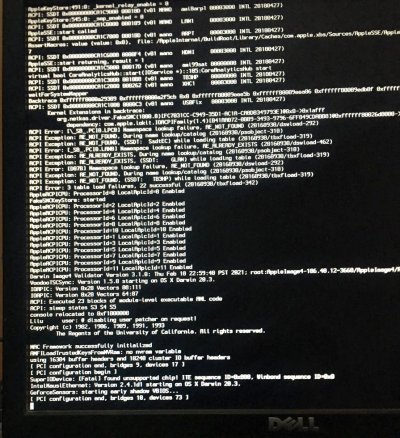
Tried installing Mac OS Big Sur on my PC. after a few hours of guides i get stuck at the PCIe Config Begins screen Specs: Ryzen 7 2700 32 GB RAM XFX RX 580 Adata SSD 128 GB Seagate HDD 2 TB Gigabyte AB350 DSH3 V2 Motherboard submitted by /u/AlinDARK [link] [comments] [► Source]