How to Fix Hackintosh doesn't boot
This mini-guide provides a structural approach to troubleshoot and fix the issue.
Prerequisites
- Confirm your hardware specifications (CPU, GPU, Motherboard).
- Ensure you have a bootable recovery USB and backup your EFI.
Fix Steps
- Boot with
-v keepsyms=1 debug=0x100to identify the exact kernel panic. - Validate your config.plist using ocvalidate.
- Ensure your EFI matches the Dortania guide specifications for your CPU generation.
Verification
- Reboot and verify if the functionality is restored and stable under typical usage.
Original Question:
Hello!
I set up a MacOS Big Sur pendrive following the instructions, i can boot into the OpenCore, but when i select the "external, dmg" option, it starts but never finishes... It gives me the following error:
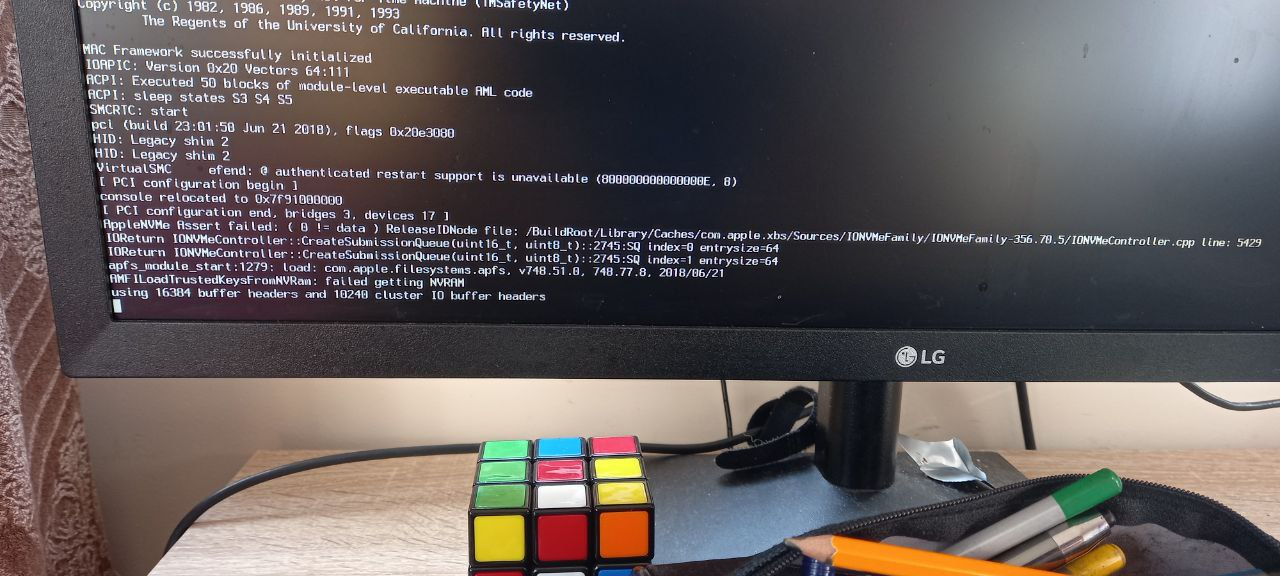
I tried searching it up but i didn't get any useful info. I'm new here. Can you tell me why its not working? Thanks!
I set up a MacOS Big Sur pendrive following the instructions, i can boot into the OpenCore, but when i select the "external, dmg" option, it starts but never finishes... It gives me the following error:
I tried searching it up but i didn't get any useful info. I'm new here. Can you tell me why its not working? Thanks!

It looks like you haven't installed Open Core on the EFI partition of your SSD. Without open core it's booting native and looking for boot keys in NVRAM. And you don't have any NVRAM.
ReplyDelete