How to Fix macOS Catalina 10.15.0 - USB Port-Limit Removal Patch
This mini-guide provides a structural approach to troubleshoot and fix the issue.
Prerequisites
- Confirm your hardware specifications (CPU, GPU, Motherboard).
- Ensure you have a bootable recovery USB and backup your EFI.
Fix Steps
- Boot with
-v keepsyms=1 debug=0x100to identify the exact kernel panic. - Validate your config.plist using ocvalidate.
- Ensure your EFI matches the Dortania guide specifications for your CPU generation.
Verification
- Reboot and verify if the functionality is restored and stable under typical usage.
Original Question:
With the release of macOS Catalina 10.15.0 you'll probably need a port-limit removal patch to begin your USB configuration on a new build.
Here it is:
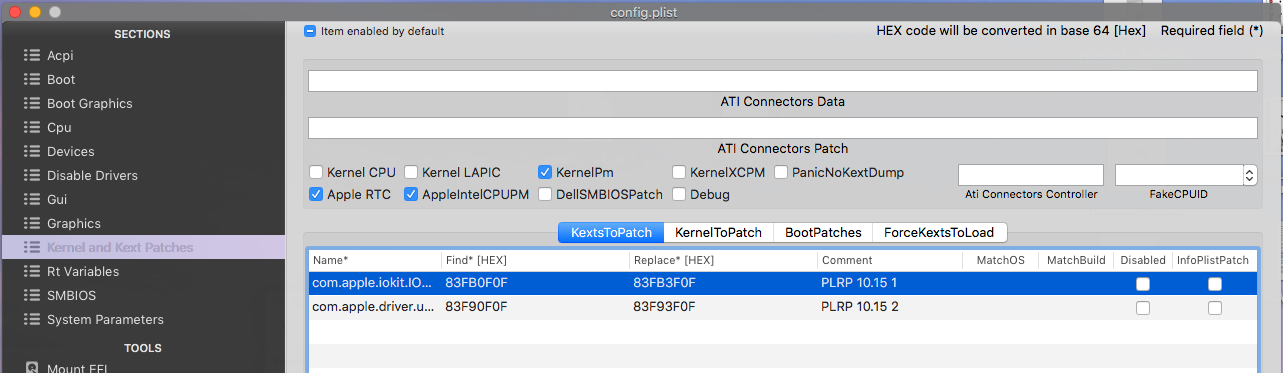
As you can see we only need two patches for Catalina as opposed to four, for Mojave.
Line 1 -
Name*: com.apple.iokit.IOUSBHostFamily
Find*: 83FB0F0F
Replace*: 83FB3F0F
Line 2 -
Name* com.apple.driver.usb.AppleUSBXHCI
Find*: 83F90F0F
Replace*: 83F93F0F
Remember you will need...
Read more
Here it is:
As you can see we only need two patches for Catalina as opposed to four, for Mojave.
Line 1 -
Name*: com.apple.iokit.IOUSBHostFamily
Find*: 83FB0F0F
Replace*: 83FB3F0F
Line 2 -
Name* com.apple.driver.usb.AppleUSBXHCI
Find*: 83F90F0F
Replace*: 83F93F0F
Remember you will need...
Read more

Post a Comment